
Create Custom GPT AI Chatbot Solutions for Your Business
Discover how our custom gpt ai chatbot solutions can transform your customer engagement. Build tailored chatbots today for enhanced efficiency!
A custom GPT chatbot is an AI assistant built and trained on your own business data. This allows it to give incredibly precise, on-brand answers. Unlike the generic bots you might be used to, these tools genuinely understand your specific products, services, and internal knowledge. They turn simple Q&A sessions into conversations that are actually helpful.
Why Your Business Needs a Custom AI Chatbot
Let's get past the buzzwords and look at the real impact of creating your own AI assistant. Businesses are moving away from one-size-fits-all chatbots for a simple reason: they need AI that gets their specific context, their language, and their customers. A generic bot can tell someone your business hours, but a custom bot can answer, "Which of your software plans integrates with QuickBooks, and what are the steps to set it up?"
This is a game-changer across the board. For an e-commerce store, it’s like having a seasoned sales associate on call 24/7, guiding shoppers to the perfect product. In a field like healthcare, it means providing instant, accurate information pulled directly from a massive library of vetted medical documents.
Unlocking Deeper Operational Value
The benefits of a custom chatbot go way beyond just the customer-facing side. Internally, it becomes a serious tool for making your team more efficient. Think about it: an AI that can instantly answer complex policy questions for HR or walk new hires through onboarding paperwork. This frees up your human experts to focus on high-level strategy instead of answering the same questions over and over.
A well-trained custom chatbot isn't just an answering machine; it's a scalable, 24/7 extension of your most knowledgeable employee. It even captures insights from user queries, revealing gaps in your help docs or common customer pain points you never knew you had.
People are clearly ready for this kind of interaction. The explosive growth of ChatGPT, which hit 100 million users in just two months, proves there's a huge appetite for conversational AI. This technology now makes up 60% of the monthly traffic among the top generative AI tools, pulling in 1.6 billion monthly visits. It's becoming a core part of how we work and live.
To give you a clearer picture, let's break down the core differences.
Key Differences Between Standard and Custom GPT Chatbots
Here's a quick look at what sets a custom GPT chatbot apart from a generic off-the-shelf bot.
| Feature | Standard Chatbot | Custom GPT Chatbot |
|---|---|---|
| Knowledge Base | General, pre-programmed information | Trained on your specific company data and documents |
| Brand Voice | Generic and robotic | Perfectly matches your brand's unique tone and personality |
| Response Accuracy | Can make errors or "hallucinate" answers | Provides highly accurate, context-aware responses |
| Use Cases | Basic FAQs, simple lead capture | Complex support, internal knowledge management, sales |
| Integration | Limited, often standalone | Deeply integrates with your existing tools and workflows |
As you can see, the leap from a standard bot to a custom one is significant, moving from a simple tool to a strategic business asset.
The Strategic Advantage of Tailored AI
At the end of the day, building a custom bot is about gaining a real competitive edge. It guarantees that every single interaction is consistent with your brand voice and backed by your company's own knowledge.
Whether it’s a sophisticated AI receptionist scheduling appointments or a support bot troubleshooting complex technical problems, customization is what makes it work. The strategic benefits of using AI chatbots are huge and can have a direct, positive impact on your bottom line.
Laying the Groundwork: Your Chatbot's Strategic Blueprint

Before you touch a single line of code or upload a document, we need to talk strategy. A truly effective chatbot isn't just a technical marvel; it's a solution to a specific problem. So, the first and most critical step is nailing down its core purpose.
What is this bot really for? Is its main job to fill the sales pipeline with qualified leads? Or is it meant to take a bite out of your support ticket queue by answering common questions? Maybe its purpose is purely internal, designed to get new hires up to speed faster.
Your chatbot's purpose is its north star. Every decision that follows-from the personality you give it to the data you feed it-needs to point back to this one goal. Without it, you're building a neat gadget, not a business tool.
This clarity shapes everything. A lead-gen bot for a marketing agency, for example, should be inquisitive and a bit persuasive, guiding prospects toward a consultation. On the flip side, a support bot for an e-commerce store needs to be direct, accurate, and focused on resolving issues about orders and returns.
What Will People Actually Ask? Mapping Out Conversations
Once you've figured out the "why," it's time to dig into the "what." What are people actually going to talk to this bot about? The best place to start is by mapping out the most common conversations you're already having.
Think about the top 5 or 10 questions your customer service team fields every single day. Those repetitive queries are pure gold-they're the foundation of your chatbot's knowledge base.
- Product Details: "Does this plan include API access?"
- Company Policies: "Can you explain your 30-day money-back guarantee?"
- Troubleshooting: "I can't log in. How do I reset my password?"
- Account Navigation: "Where on the dashboard can I find my past invoices?"
Laying this out helps you see exactly what problems your bot needs to solve on day one. It also shines a light on any gaps in your current help docs that you'll need to fill.
Assembling the "Brain" of Your AI
The final piece of your blueprint is gathering the raw materials for your chatbot's brain: its knowledge base. The intelligence of your AI is a direct reflection of the quality of the data you feed it. Garbage in, garbage out.
You can pull information from all over the place-your existing support articles, internal company wikis, product manuals, or even by having a tool like Whisperchat.ai crawl your website. The crucial part is making sure this information is accurate, current, and clearly written.
This prep work is more important than ever. The global chatbot market is projected to explode to nearly $47 billion by 2029, and that growth is fueled by businesses that get this right. By focusing on a clean, high-quality knowledge base, you’re setting your bot up to be an indispensable asset, not another frustrating dead end for your users.
Building Your Chatbot Without Writing Code
Alright, this is where the fun begins. We’re moving from planning to actually building your intelligent assistant. The best part? You don't need to be a developer to create powerful custom gpt ai chatbot solutions anymore. Tools like Whisperchat.ai have completely removed that technical hurdle, letting you focus on what you know best: your business.
This is a game-changer. Instead of trying to translate your operational needs for a programmer, you get to be hands-on. You can directly upload your company’s trusted documents, point the bot to your website, and fine-tune its behavior yourself. It puts you in the driver's seat, ensuring the final product is a true reflection of how your business actually works.
Starting with Your Data Sources
Your chatbot is only as smart as the information you give it. I always tell people to think of it like onboarding a new team member-you have to provide the right training materials for them to do their job well. Thankfully, the process is incredibly straightforward.
You'll start by feeding the AI your core business knowledge. There are a few different ways to do this, depending on where your information lives:
- Document Uploads: This is my go-to for internal knowledge. Think employee handbooks, detailed product manuals, or policy guides you have stored as PDFs or Word docs.
- Website Crawling: Just give it your website URL. The platform will automatically scan and absorb the content from your public pages, instantly turning your site into a searchable knowledge base.
- Direct Text Input: Perfect for quick additions or specific Q&As you want to make sure it knows. Just copy and paste the text right in.
This flexibility allows you to mix and match sources. You can combine the marketing copy from your website with the nitty-gritty details from your internal manuals to build a truly well-rounded assistant.
Here's a pro tip from my own experience: The quality and structure of your source data will make or break your chatbot's performance. A clean, well-organized knowledge base filled with accurate information will always lead to better, more reliable answers from your bot.
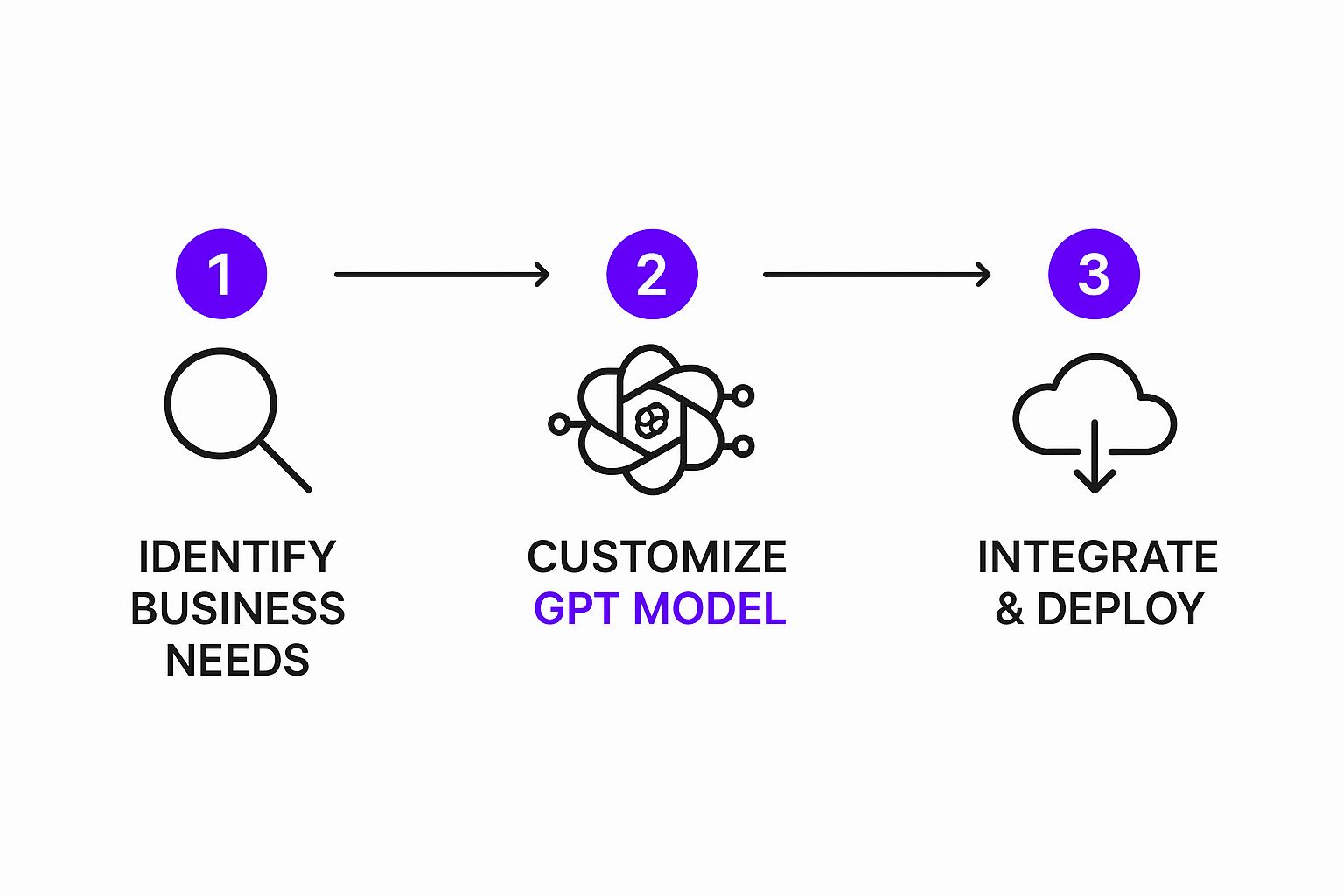
As you can see, the actual "build" is just one piece of the puzzle. It all flows from understanding your needs through to customization and launch.
Defining Your Chatbot’s Personality
Once the data is loaded, you get to work on the more creative side of things: shaping the chatbot's personality. This step is critical. It’s what makes the AI feel like a genuine extension of your brand, not just a generic, robotic tool.
You'll do all of this in a simple, visual dashboard. No code in sight.
This is where you can dial in the tone of voice. Do you want it to be formal and professional? Or more casual and friendly? You also get to set the ground rules. For example, you can instruct it to never give financial advice or to always pass complex complaints to a live agent. This level of control is what ensures your chatbot stays on-brand and operates safely within its defined role.
Our guide on how to create a chatbot without coding dives even deeper into these settings, but the main takeaway is that you have full control over how your AI interacts with your customers.
Getting Your Chatbot Live and In Front of People
An intelligent chatbot isn't worth much if no one can actually use it. After you’ve trained your bot and dialed in its personality, the final piece of the puzzle is putting it out into the world. This is where your new AI assistant goes live and starts making a real difference.

The most straightforward way to get started is by embedding the chatbot directly onto your website. If you're using a platform like Whisperchat.ai, this is incredibly easy. You’ll get a small snippet of code-usually just one line of JavaScript-that you copy and paste into your site's header or footer. The second you hit save, the chat widget pops up, ready to greet visitors.
This simple copy-and-paste approach means you can have your bot up and running in minutes. It doesn't matter if you're on WordPress, Squarespace, or a completely custom site; the process is designed to be painless.
Connecting Your Bot to Your Everyday Tools
Putting the chatbot on your website is just the beginning. The real magic happens when you integrate custom GPT AI chatbot solutions into the platforms your team already relies on. This creates a fully connected system where your bot acts as a smart bridge between your customers and your internal workflows.
Here are a few ways I’ve seen this work wonders:
- Your CRM: Imagine your bot capturing a new lead. By connecting it to your CRM, that visitor's contact info can be instantly added to your sales pipeline without anyone lifting a finger.
- Team Chat Apps: Link your chatbot to Slack or Microsoft Teams. You can set up alerts so that if a user asks something too complex for the AI, a notification gets sent to a specific channel for a human to jump in.
- Help Desk Software: You can also integrate the bot with your support ticketing system. It can handle the common questions upfront and, if things get tricky, automatically create a support ticket with the full conversation transcript attached.
These connections elevate your chatbot from a simple Q&A machine to an active part of your business operations. It saves a ton of time and ensures no important conversations get lost in the shuffle.
Best Practices for a Smooth Launch
Just having a chatbot on your site isn't a guarantee of success. Where and how you present it makes a huge difference in how much people actually engage with it.
My advice? Always do a soft launch. Before you make a big announcement, let the chatbot run quietly on your site for about a week. This gives you a chance to see how people really interact with it, spot any weird questions you didn't anticipate, and tweak its knowledge base before everyone starts using it.
The massive growth in the chatbot market shows just how valuable they've become. In 2021, the market was valued at $2.47 billion, and it's projected to explode to $15.57 billion by 2025. With nearly 987 million people using them worldwide, businesses are clearly racing to meet customer demands for instant answers. If you're curious, you can dig into more chatbot market statistics to see the bigger picture.
How to Measure and Improve Chatbot Performance
Your chatbot's launch day isn't the finish line-it's the starting block. Getting the bot live is just the first step. The real work, the part that separates a good chatbot from a great one, is the ongoing process of refinement and optimization. This is what keeps your AI a sharp, high-performing asset for your business.
I like to think of a new chatbot as a new employee. You wouldn't just hire someone and walk away, right? You'd check in, see how they're doing, and provide feedback to help them grow. The same exact principle applies here. You have to dive into the analytics to see what’s clicking with users, what’s falling flat, and where the biggest opportunities for improvement lie.
Identifying Key Performance Metrics
Before you can improve anything, you need to know where you stand. It’s easy to get lost in a sea of data, so the trick is to focus on a handful of key metrics that actually tell you a story about your bot's health.
From my experience, it’s best to start by tracking these three core areas:
- User Engagement: Are people actually talking to your bot? Keep an eye on the total number of conversations and, just as importantly, the average number of messages per conversation. Strong engagement is a fantastic sign that your audience finds it genuinely useful.
- Resolution Rate: This is arguably the most crucial metric of all. It answers the question: "Is the bot doing its job?" A high resolution rate means your chatbot is successfully handling inquiries without needing to pass them off to a human, which is exactly what you want.
- Conversation Quality: Simply put, are your users happy? Most platforms, Whisperchat included, let users give a quick thumbs-up or thumbs-down on answers. This direct feedback is pure gold for finding and fixing weak spots in your knowledge base.
By focusing on these vital signs, you get a clear, actionable picture of your chatbot’s effectiveness. For a more comprehensive look, check out our detailed guide on chatbot analytics.
Don't just stare at the numbers; hunt for the patterns. If you see dozens of users asking the same question your bot can't answer, that's not a failure. It's a massive, flashing sign pointing you directly to what you need to add to your knowledge base next.
Turning Insights into Action
Alright, you’ve got the data. Now what? This is where the magic happens. Acting on these insights is what creates the continuous improvement loop that defines the best custom gpt ai chatbot solutions. Your analytics dashboard isn't just a report card; it's your roadmap for refinement.
Monitoring your bot's performance is all about understanding what the data is telling you so you can make smart, targeted improvements. Here's a breakdown of some essential metrics I always recommend keeping an eye on.
Essential Metrics for Chatbot Optimization
| Metric | What It Tells You | How to Act on It |
|---|---|---|
| High Escalation Rate | The bot is consistently getting stuck on certain topics or questions. | Dive into the unresolved chats. Identify the common themes and update your knowledge base with clearer, more direct answers for those topics. |
| Low Engagement | Your chatbot isn't visible enough, or the initial greeting isn't compelling. | Experiment with the chatbot's placement on your website. Try A/B testing different welcome messages to be more proactive and inviting. |
| Negative Feedback Scores | Specific answers are wrong, unhelpful, or out of date. | Pinpoint the exact questions getting poor ratings. Go back to the source content and rewrite it to be more accurate and helpful. |
This process-measure, learn, refine-is a cycle, not a one-time task. As your business evolves and your customers' needs shift, your chatbot should evolve right alongside them. Regularly checking in on its performance ensures your AI assistant remains a valuable, efficient, and even well-loved part of your customer experience.
Got Questions About Custom GPT Chatbots?
Even with a great tool in your hands, stepping into the world of custom GPT AI chatbots for the first time usually comes with a few questions. I get it. Let's tackle some of the most common ones I hear from businesses just getting started.
Do I Really Need to Be a Coder to Build a Custom Chatbot?
Nope, not anymore. This is probably the single biggest myth holding people back. Modern no-code platforms like Whisperchat.ai have completely changed the game, meaning you don’t need a single line of code.
The work has shifted from technical grunt work to pure business strategy. Your job is to focus on what actually moves the needle: knowing your business goals, understanding your audience, and feeding the AI high-quality, accurate information. The platform does all the heavy lifting on the backend, so you can focus on what the chatbot should know, not how to build it.
What Kind of Data Can I Actually Use to Train It?
You’ve got a lot of options here, and you probably have more useful training material than you think. The best-performing chatbots I've seen are trained on a solid mix of a company's own documents. Simply put, the better your source material, the more helpful your chatbot will be.
Here are some of the most effective sources:
- Company Documents: Think about your internal handbooks, detailed product guides, and policy PDFs. They're goldmines of information.
- Your Website: You can point the tool directly at your website and let it crawl the content, instantly turning your public pages into a knowledge base.
- Help Center Articles: Your existing FAQ pages and knowledge bases are perfect for this. They’re already structured to answer real-world user questions.
The key isn't just dumping a ton of data in. It's about using clean, well-organized information that directly answers the kinds of questions your customers and team are already asking.
Expert Tip: The secret to a successful chatbot isn't a massive volume of data; it's the right data. A few well-written, relevant documents will always outperform a giant, disorganized data dump.
How Do I Stop My Chatbot from Giving Weird or Wrong Answers?
This is a huge, and very valid, concern. The good news is you have complete control over this. You keep the chatbot on track in a couple of key ways.
First, you’re giving it a curated, trusted knowledge base. It can only answer questions based on the information you've provided and approved. It literally can’t talk about things you haven't taught it.
Second, you can set strict rules and define its personality to fence off topics it shouldn't discuss. Most platforms, including Whisperchat.ai, also let you set up an escape hatch-a trigger that escalates sensitive or complex questions directly to a human agent. This ensures every user has a safe and reliable experience.
Can I Make the Chatbot Look Like It Belongs on My Website?
Of course! Making the chatbot feel like a natural part of your brand is one of the biggest perks. You can customize pretty much everything-the chatbot's name, its avatar, and the colors of the chat widget-to match your website's look and feel perfectly.
This creates a seamless, professional experience for your visitors, making the chatbot feel less like a bolted-on gadget and more like an integrated part of your team.
Ready to build an AI assistant that actually gets your business? With Whisperchat.ai, you can launch a custom-trained chatbot in just a few minutes. Start your free trial today and see what it can do for you.