
Your Guide to Training a Chatbot That Works
Learn how to master training a chatbot with our guide. We cover data prep, AI configuration, testing, and deployment for a bot that gets results.
So, you're ready to train your chatbot. It’s easy to think of this as a purely technical task, but the real secret to success lies in strategy. It's less about complex code and more about the quality and focus of the information you feed the AI from day one.
Why Most Chatbot Training Fails
I’ve seen it time and time again: businesses get excited about AI, dump a folder of random documents into a platform, and then wonder why their new chatbot is so frustratingly useless. This approach almost always backfires, creating a bot that confuses users more than it helps.

The hard truth is that a chatbot is only as smart as the information it’s built on. Before you upload a single file, you need to step back and ask a fundamental question: What, exactly, is this chatbot for? What specific problem is it going to solve?
- Looking to slash support tickets? Then your training data needs to be laser-focused on detailed FAQs, step-by-step troubleshooting guides, and maybe even anonymized historical support chats.
- Trying to boost sales? The bot needs to learn from compelling product descriptions, glowing customer reviews, and sales-oriented Q&A documents.
- Onboarding new hires? Its knowledge base should be built exclusively from company handbooks, policy documents, and essential HR information.
The Data Quality Dilemma
The single biggest reason chatbot projects fail is poor data quality. Tossing your entire, unorganized library of internal files into the system is a classic "garbage in, garbage out" scenario. An AI trained on conflicting, outdated, or irrelevant information can't give clear answers. It just gets confused.
This is why having a clear objective is non-negotiable-it acts as your filter, telling you which data is gold and which is just noise. Your goal is to become a curator, building a clean, focused, and powerful knowledge base for your bot. For a detailed walkthrough of the technical process, you can find our full guide right here: https://www.whisperchat.ai/docs/train-bot.
The secret to success lies in curation. A chatbot trained on ten high-quality, relevant documents will always outperform one trained on a thousand random, unstructured files. Your job is to be the expert librarian for your AI.
Why Great Training Matters More Than Ever
The pressure to build genuinely helpful bots is mounting, and you can see why when you look at the market. The global chatbot industry was valued at around $2.47 billion in 2021. Fast forward to 2029, and it's projected to explode to an incredible $46.64 billion.
This massive growth shows just how much demand there is for AI that actually works. To stand out, you have to move beyond the basic "upload and pray" method and invest in strategic training that delivers real value and reliable answers every time.
A well-planned training strategy is built on a few core pillars. Understanding these elements and how they influence your chatbot's final performance is the key to getting it right.
Key Elements of Chatbot Training Success
| Core Component | Why It Matters | Impact on Performance |
|---|---|---|
| Clear Objective | Defines the bot's purpose and scope. | Ensures all training data is relevant, preventing scope creep and confused responses. |
| Curated Data | Provides clean, accurate, and up-to-date information. | Drastically reduces incorrect or nonsensical answers, building user trust. |
| User Intent Focus | Training anticipates what users will actually ask. | Leads to faster, more accurate responses that directly address user needs. |
| Iterative Testing | Involves asking the bot questions and refining its knowledge. | Catches blind spots and weaknesses before launch, improving reliability. |
By focusing on these components, you shift from simply uploading data to strategically building an intelligent assistant that truly serves its purpose and provides a great user experience.
Giving Your Chatbot Its Brain: Building the Knowledge Base

Let's be honest: an AI chatbot is only as good as the information you feed it. This is where the magic really happens-transforming your company's existing content into a powerful brain for your bot.
Think of yourself as a librarian for your AI. You've already got a wealth of knowledge sitting in your company files. We're talking about FAQs, support articles, product manuals, and even the pages on your website. Every single piece is a building block. Your job is to curate this collection so the chatbot can make sense of it all.
How to Structure Data So Your Bot Can Learn
You can't just dump a 200-page user manual into the system and call it a day. That's a recipe for disaster. AI gets lost in massive, dense documents. The secret is to break down your big, complex information into small, bite-sized chunks.
For instance, instead of one giant "Company Policies" document, create separate, focused files. One for "Vacation Policy," another for "Remote Work Guidelines," and a third for "Expense Reporting Procedures." This granular approach helps the AI pinpoint the exact right answer without getting bogged down in stuff that doesn't matter.
Expert Tip: Think of each document or text entry as the one true source for a single topic. When a customer asks about returns, the AI should only need to look at your "Return Policy" document, not wade through the entire product catalog to find an answer.
This focused strategy is absolutely essential for a reliable knowledge base. If you want to really get into the weeds on this, we've got a whole guide on building an effective https://www.whisperchat.ai/blog/chatbot-knowledge-base from the ground up.
Finding the Best Content to Feed Your Bot
The quality of your source material has a direct line to your chatbot's performance. Garbage in, garbage out, as they say. Start by rounding up your most accurate, up-to-date content.
Here are some gold mines you probably already have:
- Website Pages: Your "About Us," "Pricing," and "Services" pages are perfect low-hanging fruit.
- Support Docs: FAQs, troubleshooting guides, and how-to articles are the lifeblood of a customer support bot.
- Product Info: For e-commerce or SaaS bots, you absolutely need detailed product descriptions, feature lists, and tech specs.
- Internal Docs: Powering an internal HR bot? Employee handbooks and policy documents are your best friends.
If you need to pull in information from various websites but don't want to get bogged down in code, learning how to automate web scraping without any code is a massive time-saver. It lets you pull public info right into your training data.
Clean vs. Messy Data: A Real-World Example
Imagine you run an online store selling high-end coffee makers. Let's look at two ways to prepare your data.
The Messy (and Bad) Way: You upload a single PDF file that jams everything together-product descriptions, the company's history, brewing tips, and the return policy. When a customer asks, "What's your return window?", the AI has to dig through the entire messy document. It might get confused and spit out a random fact about the company being founded in 1998. Not helpful.
The Structured (and Good) Way:
You take a few extra minutes to create clean, clearly labeled text files: Returns.txt, EspressoMachineX_Specs.txt, and BrewingTips.txt. Now, when the same question comes in, Whisperchat.ai knows exactly which file holds the answer.
The result? A fast, accurate, and trustworthy response. This structured method is the difference between a chatbot people love and one they complain about.
Alright, you’ve done the hard work of gathering and cleaning up your data. Now for the fun part: feeding it all to your Whisperchat.ai bot. This is where your carefully prepared knowledge becomes the brain of your AI assistant. Don't worry, this process, often called data ingestion, is more straightforward than it sounds.
Think of it like this: training a chatbot isn't a one-and-done task. It’s a continuous loop of feeding it information, training it, and then refining it based on its performance.
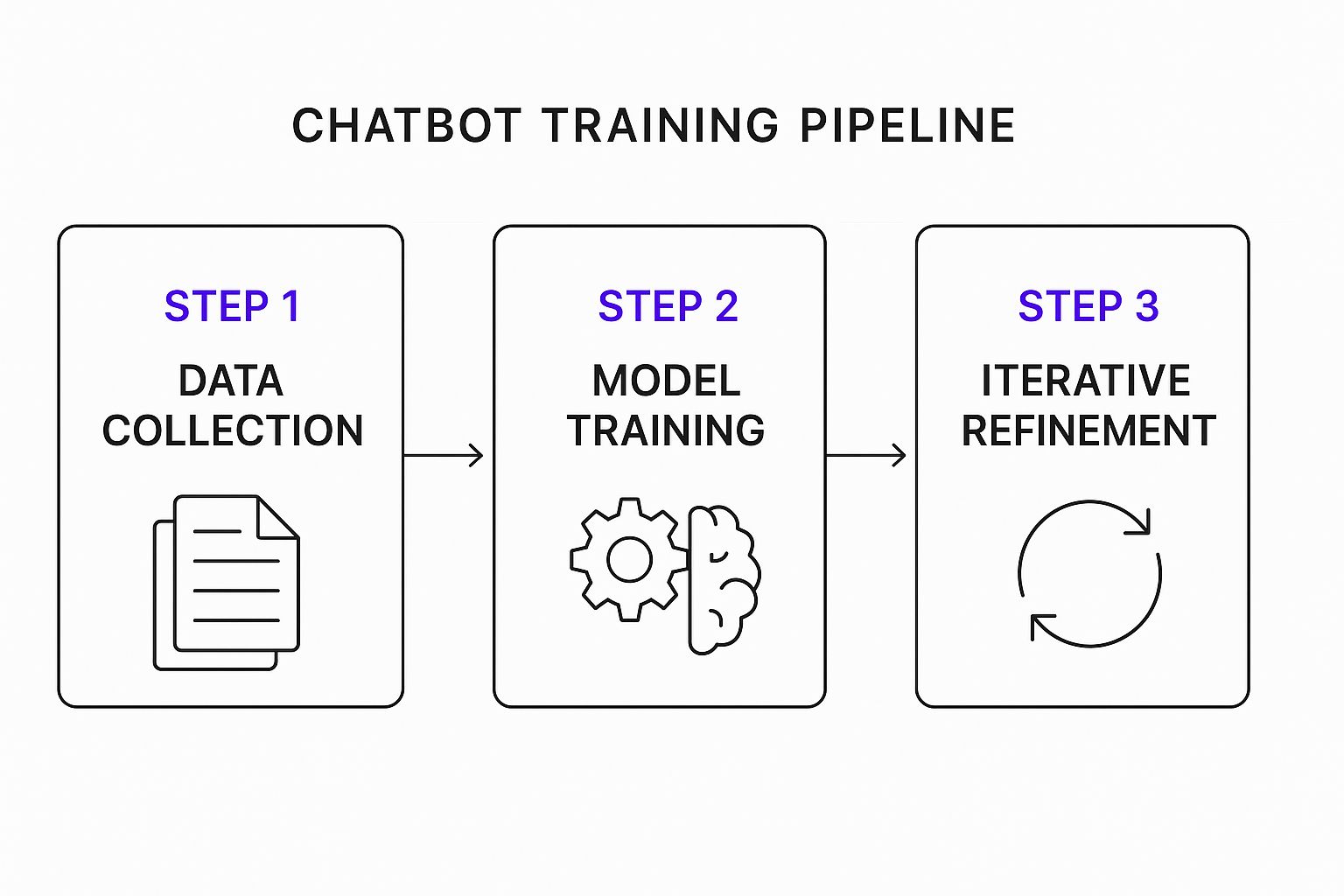
As you can see, the real magic happens in that refinement stage, which circles right back to improve the data and training for the next round. It’s an ongoing cycle of improvement.
How to Get Your Knowledge Into the Bot
Whisperchat.ai gives you a few different ways to upload your content. The best method really just depends on what kind of information you have and where it's stored.
Here are your main options:
- File Uploads: This is your best bet for internal documents. Got product manuals, company handbooks, or detailed FAQs saved as PDF, TXT, or Word files? Just drag and drop them right into the uploader. It's incredibly simple.
- Website Scraping: If you have solid content already on your website, you can just give Whisperchat.ai the URL. The platform will crawl the page, extract all the text, and add it to the bot's knowledge base. This is perfect for your "About" page, blog posts, or service descriptions.
- Manual Text Snippets: Sometimes you just have a small, specific piece of info to add. Maybe it's a quick update to a company policy or a short-term promotional message. For these, you can paste text directly into the tool without needing a separate file.
Here’s a little tip from my own experience: I always start by scraping the main, public-facing website pages first. This builds a strong foundational understanding for the bot. After that, I layer on the more detailed, internal documents to fill in any gaps. This approach helps create a really comprehensive and capable AI.
Keeping an Eye on the Upload
You won’t be left guessing once you start the ingestion process. The platform shows you exactly what's happening in real-time as it processes and indexes your content.
You'll get a clean dashboard where you can manage all your data sources at a glance. It's easy to see which files were ingested successfully and which ones might need another look, giving you full control over your bot’s knowledge base.
Once the initial ingestion is done-which typically only takes a few minutes-your chatbot has its core knowledge. The system will let you know as soon as the indexing is complete. That’s your green light. It means your data has been successfully converted into a format the AI can search through to pull out answers instantly. Now, you’re ready to move on to configuration and the first round of testing.
Giving Your Chatbot a Personality and Rules
Once you’ve loaded your chatbot with all the right information, it’s time for the fun part: giving it a personality. This is where you transform a simple Q&A machine into a genuine extension of your brand. An AI with just facts is a database; an AI with a distinct voice becomes a true brand ambassador.
This is all about moving beyond the raw data and deliberately shaping how your bot interacts, what it sounds like, and how it handles tricky situations. In Whisperchat.ai, you'll do most of this work in the base prompt. Don't let the simple text field fool you-this is the single most important instruction you will ever give your bot. It's the blueprint for its identity.
Crafting a Great Base Prompt
Think of the base prompt as your bot's core mission statement. It needs to be direct, clear, and packed with instructions on who it is and how it should act.
Vague prompts like "Be helpful" are a recipe for a bland, forgettable bot. A great prompt, on the other hand, is specific and full of character.
Here are a couple of real-world examples to get you thinking:
- For an e-commerce store: "You are a friendly and enthusiastic shopping assistant for 'The Coffee Bean Co.' Your goal is to help users find the perfect coffee blend and brewing gear. Always be positive and use encouraging language."
- For a SaaS company: "You are a professional and patient technical support expert for 'InnovateCRM.' Your responses must be clear, concise, and focused on solving user problems. Avoid jargon and never guess an answer."
This one instruction sets the tone for every single interaction that follows. It's the foundation for everything.
Setting Up the Rules of Engagement
Beyond its core personality, your bot needs some ground rules. These are your operational guardrails-the instructions that ensure it behaves predictably and reliably, especially when it doesn't know something. This is a critical part of the process because it dictates how the bot handles the edges of its knowledge.
A solid set of rules is what stops a user from getting frustrated and giving up. It tells the bot exactly what to do when it hits a dead end, paving the way for a smooth handoff instead of a confusing, unhelpful response.
You can set these rules directly within the Whisperchat.ai settings. I always recommend starting with these key configurations:
- The "I don't know" response: What happens when the bot can’t find an answer? A good default is something like, "I'm not sure about that, but I can connect you with a human expert who can help."
- Escalation triggers: You need to define keywords or phrases (like "speak to a human" or "complaint") that automatically transfer the chat to a live agent. This is non-negotiable for good service.
- Topic boundaries: Teach the bot to gracefully bow out of conversations it’s not trained for. For instance, "I can only answer questions about our products and services. How can I help you with that?"
This is the kind of detailed setup that separates a basic, clunky bot from a truly effective one. It’s also why customer service chatbots now hold the largest market share-about 31.31%-of all chatbot applications. Businesses are investing in this level of fine-tuning because it has a direct impact on reducing operational costs and making customers happier. You can dig into more AI chatbot trends and statistics at thunderbit.com if you're curious.
By taking the time to build a strong personality and clear rules, you’re creating a bot that’s predictable, on-brand, and genuinely helpful.
How to Test and Refine Your Chatbot

So, you’ve fed your chatbot a library of information. Now comes the most important part: making sure it actually works in the real world. Launching a bot without putting it through its paces is a recipe for disaster. This is where you transform your bot from a simple database into a truly helpful assistant.
Think like your customers. What are the first things they’re going to ask? Start there. Fire off the easy, common questions and see how the bot handles them. Is the answer right? Is it clear? Once you’ve confirmed the basics, it’s time to really push its limits.
Probing for Weaknesses
Your mission here is to break the chatbot so your users don't have to. You need to actively look for the cracks in its logic before a frustrated customer finds them. Get creative and try to trip it up.
Here are a few things I always try:
- Ambiguous Questions: Ask something that could mean a few different things. For example, "What's the policy on returns?" and immediately follow up with, "What about for international orders?" This tests how well it handles context.
- Edge Cases: What if someone asks about a product you stopped selling last year? Or a service you no longer offer? The bot’s ability to handle these outliers is a true test of its sophistication.
- Slang and Typos: People rarely type with perfect grammar. Throw common misspellings, abbreviations ("what's the eta on my order?"), and casual slang at your bot. A good AI should be able to decipher the user's intent, not just the literal words.
To do this effectively, you need a solid Quality Assurance (QA) plan. You can even borrow from traditional development and master software QA management principles to build a structured testing workflow. This takes you from just poking around to systematically hunting down potential failures.
Using Whisperchat.ai to Find and Fix Issues
This is where the Whisperchat.ai platform really shines. Your dashboard is the command center for this whole operation, logging every single interaction. When you see the bot give a strange or flat-out wrong answer, you can immediately investigate.
The platform shows you the exact document or data source the AI pulled from to formulate its response. This is a game-changer. If an answer is inaccurate, you know precisely which file in your knowledge base needs to be updated or removed. This constant feedback loop-test, review the logs, and tweak the data-is how you achieve continuous improvement.
A chatbot isn't a "set it and forget it" tool. The best ones are constantly refined. Regularly reviewing conversation logs to spot recurring failed questions gives you a roadmap for what new knowledge to add next.
As you polish your bot, keep the end goal in mind: a smooth, helpful conversation. It’s not just about factual accuracy but also about creating a positive experience for the user. For a deeper dive, check out our guide on improving the chatbot user experience for more strategies.
Ultimately, this cycle of testing and refining is what builds trust with your audience. It ensures your bot becomes a dependable asset for your business, not just a flashy gimmick.
Bringing Your Chatbot to Life and Making It Smarter
Alright, you’ve put in the work. Your knowledge base is solid, the settings are dialed in, and you've tested everything you can think of. Now for the exciting part: letting your chatbot meet real users on your website.
Getting the chatbot live is actually one of the easiest steps. Inside Whisperchat.ai, you’ll find a simple code snippet. Just copy and paste this into your website's HTML, and the chat widget will appear. It’s a process that genuinely takes just a few minutes.
But don't pop the champagne just yet. Going live isn't the finish line; it’s the starting line for a whole new phase of work-the part where your bot gets truly intelligent.
Keeping an Eye on Performance and Spotting Weaknesses
Once your chatbot starts having conversations, the Whisperchat.ai dashboard becomes your new best friend. This is where you'll find all the data you need to see what's working and what isn't. The numbers don't lie, and they'll show you exactly where to focus your efforts.
You'll want to keep a close watch on a few key things:
- Resolution Rate: This is the big one. What percentage of conversations does the bot handle successfully on its own, without a human needing to step in? A high resolution rate means it's doing its job well.
- User Satisfaction: The simple thumbs-up or thumbs-down ratings users can leave are gold. This is direct, unfiltered feedback on how helpful people find your bot.
- Escalation Frequency: How often does a conversation get passed to a live agent? If this number is high, it’s a red flag that your knowledge base has some serious gaps.
- Most Common Questions: Pay attention to what people are asking over and over. This tells you which topics are most important to your users and where you should focus on adding more detail.
This isn't about guessing anymore. This is about using real data to understand exactly where the chatbot shines and, more importantly, where it's falling short.
A chatbot you set and forget will quickly become outdated. The real magic happens when you treat it like a living part of your team, constantly learning from real interactions to get smarter and more helpful every single day.
The Never-Ending Cycle of Improvement
The insights you get from your analytics are what drive the next round of improvements. Let's say you see a dozen different people asking about a specific product feature that your bot knows nothing about. That’s your signal.
Your job is to create a new, comprehensive document explaining that feature in detail and add it to your knowledge base. This creates a really effective feedback loop that looks something like this:
- Launch your bot and let it talk to real users.
- Monitor the conversation logs and analytics to see how it's doing.
- Identify the questions it can't answer or topics it struggles with.
- Update the knowledge base by adding new documents or improving existing ones.
- Retrain the bot on the new and improved data.
Rinse and repeat. This is how your chatbot goes from a static Q&A tool to a dynamic assistant that evolves with your business. It learns what your customers actually need and gets better at providing it. This commitment to ongoing refinement is what separates a decent bot from one that truly transforms your customer support.
Ready to build a smart, self-improving assistant for your website? With Whisperchat.ai, you can go from data to a live, intelligent chatbot in minutes, with no coding required. Start your free trial today and see how easy it is to automate support and engage customers.