
A Guide to Building a Chatbot with Whisperchat
Learn how to master building a chatbot with Whisperchat. This guide provides actionable steps for data training, branding, and successful deployment.
Creating a chatbot is a smart way to handle customer questions, find new leads, and offer support anytime, day or night. With no-code tools like Whisperchat.ai, you can build a custom AI assistant just by uploading your company's documents. It's a remarkably fast and accessible way for any business to get started with AI.
Why a Chatbot Has Become a Business Staple
Not too long ago, building a chatbot meant hiring developers and spending a lot of money, which put it out of reach for most companies. That's all changed. No-code solutions have opened the door for anyone to build and launch a capable AI assistant, turning it from a cool tech gadget into a fundamental tool for improving how you engage with customers.
The results speak for themselves. Just think about these real-world examples:
- An e-commerce store: Imagine a chatbot acting as a personal shopper, instantly answering questions about fabrics, sizing, or shipping. It helps reduce abandoned carts and nudges customers toward making a purchase.
- A healthcare clinic: A chatbot can field appointment requests, handle common questions about services, and even provide instructions before a visit. This frees up your front-desk staff to focus on more involved patient care.
From Tech Novelty to Business Necessity
The move toward AI assistants isn't just a passing trend-it's a real shift in how companies get things done. The global chatbot market was already valued at $2.47 billion in 2021 and is expected to rocket to $46.64 billion by 2029. That kind of growth shows just how much value businesses are getting from smart, automated conversations.
The Whisperchat interface, shown below, is a great example of this simplicity. You can see just how easy it is to upload your business data and start training your own chatbot.

The whole point is to turn the content you already have-FAQs, product guides, website copy-into a conversational knowledge base for your AI. And you don't have to write a single line of code.
Using AI to Solve Real-World Problems
A chatbot does more than just answer questions; it solves genuine business challenges. It can qualify potential customers after hours, lighten the load on your support team, and ensure every customer gets a consistent brand experience. To really understand how these assistants can drive success, it’s worth exploring the transformative potential of a personalized chatbot.
A well-made chatbot is more than just a conversation machine. It becomes a tireless member of your team, working 24/7 to help customers, collect feedback, and support your growth.
This guide will show you exactly how to build this kind of asset with Whisperchat. We'll skip the heavy theory and stick to practical steps-from preparing your data and training the AI to getting a fully functional chatbot live on your website.
Building Your Chatbot's Brain: Preparing and Feeding It Knowledge
This is where your chatbot’s intelligence really begins to take shape. The quality of the information you feed it directly impacts how smart and helpful your AI will be. Think of it less like coding and more like curating a library for an eager student-the better the books, the better the student.
The whole process kicks off with gathering your raw materials. Luckily, this knowledge is probably scattered across places you already use every day.

One of the best things about working with a platform like Whisperchat.ai is that you don't need a perfectly manicured database. It’s built to handle the kind of content formats that businesses actually have on hand.
Choosing Your Data Sources
The first practical step is to figure out what your chatbot actually needs to know. For most businesses, this core information lives in a few key places. Whisperchat makes it easy by accepting several different types of data sources.
Here are the most common and effective ones to start with:
- Website Content: Your website is often your single best source of public information. Just give Whisperchat a URL, and it can crawl the pages, soaking up everything from your service descriptions to your company history.
- PDF Documents: Got product manuals, research papers, or detailed service guides? Uploading a PDF is like handing your chatbot an entire instruction booklet it can master instantly.
- Text Files (.txt): This is my go-to for curated content, especially FAQs. Just copying your existing FAQ page into a simple text file creates an incredibly powerful and focused knowledge source for the bot.
Let's take a real-world example. Imagine an e-commerce store that sells high-end camera gear. They could upload the PDF manual for every camera model they carry. When a customer asks, "How do I change the aperture on the Model X camera?" the chatbot can pull the exact instructions right from the correct manual. That’s the power of using targeted, high-quality data.
Prepping Your Content for the Best Results
While Whisperchat is a powerful tool, the old saying "garbage in, garbage out" absolutely applies here. Taking just a few minutes to clean up and structure your source material will pay off massively in your chatbot's accuracy and performance. It’s all about quality, not just quantity.
For instance, if you're preparing an FAQ document, keep it clean and to the point.
- Stick to Clear Q&A Pairs: Structure your text file with distinct questions followed by concise answers. Try to avoid long, rambling paragraphs that mix multiple topics together.
- Cut Out the Fluff: Edit out conversational filler, navigation links like ("Click here to learn more"), or any weird formatting that might confuse the AI.
- Stay Consistent: Use the same terminology for your products and services. If you call a feature "Auto-Sync" in one document, don't call it "Automatic Synchronization" in another.
The goal isn't just to dump massive volumes of data into the AI. It's about giving it clean, unambiguous, and well-organized information. I've found that a single, well-formatted 10-page manual is often far more valuable than 100 pages of disorganized website copy.
This prep stage is fundamental if you want to build a chatbot that users actually trust. A well-fed bot gives accurate answers, reflects your brand's voice, and becomes a reliable resource instead of a frustrating dead end.
How the Ingestion Process Works
Once your files are ready, getting them into Whisperchat is refreshingly simple. You just select your data source type-URL, PDF, or text file-and then upload or link your content. The system immediately gets to work, breaking down all that information into small, digestible chunks the AI can understand and recall in an instant.
But this isn't just a simple file upload. Behind the scenes, the platform is creating a specialized index of your information. This allows the chatbot to perform what’s called a "semantic search," meaning it looks for answers based on the meaning of a user's question, not just keywords.
That’s the magic that lets a customer ask, "How much is this?" and the chatbot understands to look for pricing info, even if that exact phrase isn't anywhere in your documents. It’s a crucial difference that makes the chatbot feel genuinely intelligent.
Fine-Tuning Your AI Chatbot for Prime Time
Once your documents are uploaded, Whisperchat gets to work. It’s not "training" like you'd teach a person, but rather building a sophisticated index of all your information. This is what allows the AI to sift through everything you’ve given it and pull out the right answer in a flash. Now, the real hands-on part begins for you: testing and refining.
This is, without a doubt, the most critical loop in building a chatbot that actually helps people. You have to get in there and repeatedly test your bot, see what it says, and then tweak your source material to sharpen its accuracy. Think of yourself as a coach, running drills to spot weaknesses and build on strengths.
Figuring out what users will actually ask, mapping out those potential conversations, and then testing the results is the core of this whole process. It’s a simple, repeatable cycle that makes all the difference.
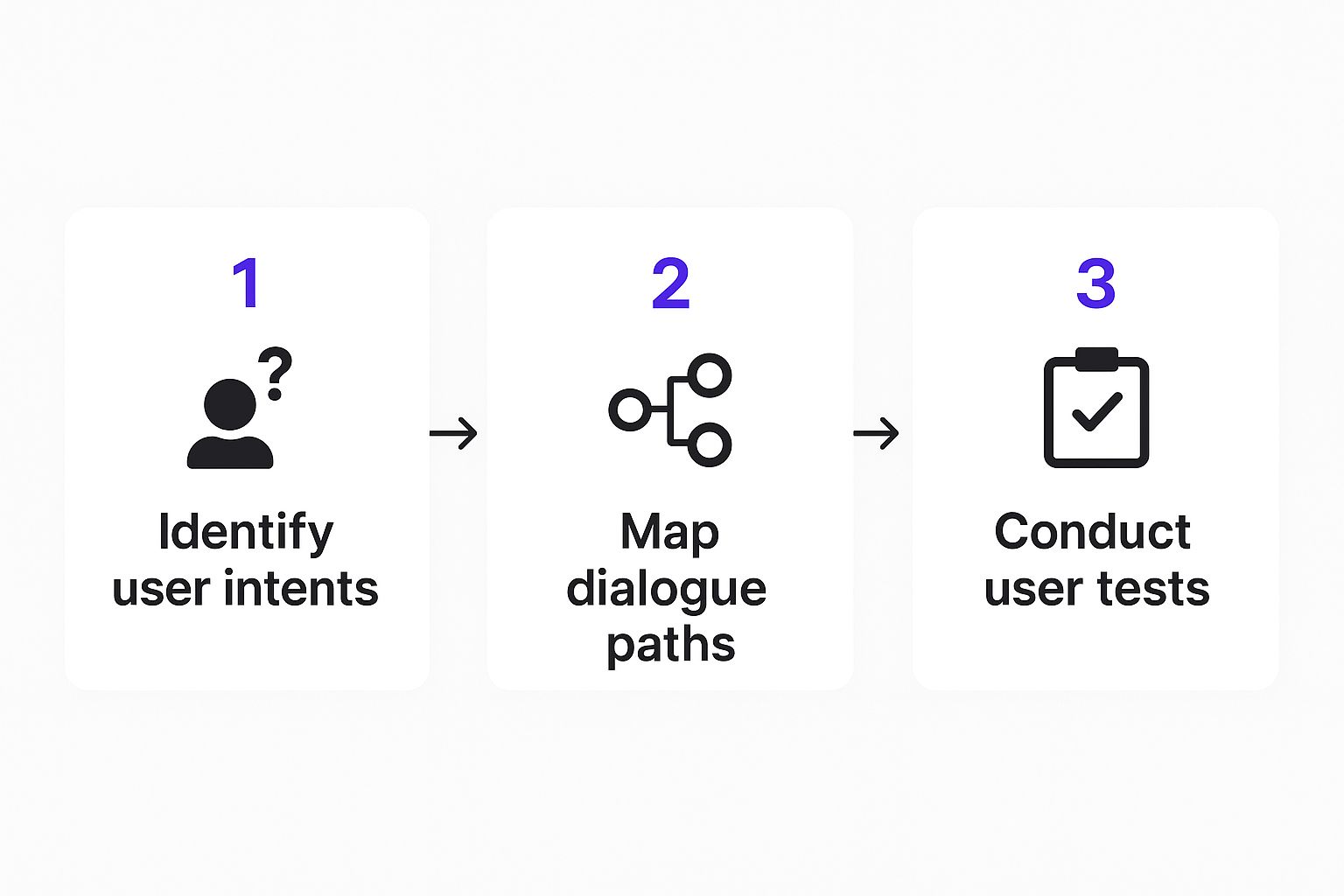
As you can see, a successful chatbot isn't a "set it and forget it" tool. It all starts with understanding your users and then committing to hands-on testing, creating a powerful feedback loop for continuous improvement.
A Practical Playbook for Testing
Okay, so where do you start? Don't just fire off random questions; you need a strategy. The goal is to push the boundaries of your chatbot's knowledge to see where it shines and, more importantly, where it stumbles. A structured approach ensures you’re covering all the bases.
Here’s a quick checklist of the question types I always use to stress-test a new bot:
- Simple Factual Queries: Start easy. Ask direct questions that have a clear answer in your documents, like "What are your business hours?" or "What's the return policy?" This is just to confirm the fundamentals are working.
- Comparative Questions: Now, make the bot think a little. Ask something like, "Can you compare Product A and Product B?" This forces it to pull details from different places and present them in a logical way.
- Vague or Ambiguous Prompts: See how it handles a user who isn't super specific. A query like "Tell me about your services" is a great test. Does it give a helpful summary or just get confused?
- Out-of-Scope Questions: You need to know what happens when it doesn't know the answer. If you ask an e-commerce bot about the weather, it should politely say, "I can't help with that," not make something up.
This testing phase is all about iteration. For a deeper dive into the end-to-end process, check out our complete guide on how to build a powerful chatbot from the ground up.
Hunting Down and Fixing Bad Answers
When you find a weak or just plain wrong response, your first instinct might be to change the chatbot's settings. Resist that urge. The problem-and the solution-almost always lies in your source data. Whisperchat's interface is great for this because it lets you trace an answer right back to the specific document it came from.
Let's say you run a SaaS company, and your bot gives a garbled explanation of a feature called "Auto-Sync."
My Personal Tip: Don't try to fix a bad answer by just throwing more documents at the problem. More often than not, the issue is a single confusing sentence in a document you've already uploaded. I've found that refining one paragraph is way more effective than adding ten new pages.
You click through to the source PDF and see the paragraph describing Auto-Sync is packed with technical jargon. The fix is simple: rewrite that paragraph to be clearer, re-upload the document, and let the bot re-index it. This tiny tweak can make a world of difference in the quality of its answers on that topic.
The Cycle of Constant Improvement
Building a great chatbot isn't a one-and-done project. It's an ongoing cycle of refinement driven by real user interactions. The initial testing you're doing now is just setting the stage.
Once your bot is live, Whisperchat's analytics will show you the exact questions people are asking. This data is pure gold. It gives you a clear roadmap for what to improve. If you see that 20% of users are asking about international shipping and your bot is coming up empty, that's your cue to add a section about it to your FAQ document.
This simple cycle-Test, Analyze, Refine, Repeat-is the secret sauce. It’s how you turn a good chatbot into an indispensable assistant that gets smarter and more valuable over time.
Making the Chatbot Your Own: Customizing Appearance and Personality
Building a smart chatbot is just the starting point. If it doesn't look and feel like it belongs on your website, people won't trust it. This is where you get to roll up your sleeves and customize-turning a generic AI tool into a true brand ambassador. With a platform like Whisperchat.ai, you can dial in both the visual style and the conversational personality, all without writing a single line of code.
This isn't just about making things look pretty; it's about crafting a smooth, cohesive user experience. When a chatbot mirrors your site's design and speaks in your brand's voice, it feels professional and integrated. That small detail goes a long way in building credibility and encouraging people to actually use it.

Dialing in Your Brand’s Visual Identity
Your chatbot widget is essentially a new part of your website, so it really needs to look the part. Clashing colors or a generic icon can make the whole experience feel clunky and disconnected. Thankfully, getting the chatbot’s appearance to match your brand palette is a piece of cake.
Inside the Whisperchat dashboard, you get direct control over the key visual elements to keep everything consistent.
- Brand Colors: You can adjust the header, chat bubbles, and accent colors to match your brand's exact hex codes. It's a small change, but it makes the chatbot feel like a native feature of your site, not a tacked-on afterthought.
- Logo and Avatar: Pop in your company logo or a custom avatar. I've found that using an avatar-whether it's a friendly mascot or a team member's headshot-can make the conversation feel more personal and a lot less robotic.
- Welcome Message: This is your chatbot’s first handshake. You want a greeting that’s inviting and clearly sets expectations. Ditch the generic "How can I help you?" for something that reflects your brand, like "Welcome to [Your Brand]! Ask me anything about our products or shipping."
These visual tweaks are the foundation for building a chatbot that people feel comfortable talking to from the moment it pops up.
Shaping Your Chatbot’s Persona
Looks are important, but it's your chatbot's personality that truly defines the experience. You have total control over its tone and conversational style, and you shape it with simple, plain-language instructions-no programming needed.
The key is to think about your audience. Are they looking for no-nonsense, professional answers, or would they prefer a more casual, friendly chat? The persona you create should match what they expect from your brand.
For instance:
- A financial services firm might instruct its bot: "You are a professional and formal assistant. Provide direct, factual answers without using slang or emojis. Your primary goal is to deliver accurate information efficiently."
- An online boutique could take a completely different route: "You are a friendly and enthusiastic shopping assistant! Use a warm and casual tone. Feel free to use emojis where appropriate. Your goal is to help customers find products they'll love."
Getting the persona right is what elevates a chatbot from a simple Q&A tool to a memorable brand experience. I’ve seen engagement rates jump significantly just by tweaking the base instructions to be more aligned with the company’s voice.
Not long ago, this level of customization was a massive undertaking. The investment for custom chatbot development and deployment could run anywhere from $5,000 to $500,000, depending on how complex you got. This chatbot industry report on ExplodingTopics.com breaks down the numbers. It’s the no-code platforms like Whisperchat that have finally made this accessible to everyone.
Fine-Tuning Conversational Behavior
You can also set specific ground rules to manage how the chatbot behaves in certain situations, making sure it acts exactly as you want it to. Again, this isn't about complex coding, just simple directives you type right into a settings field.
Here are a few powerful instructions you can put to use immediately:
- Set Knowledge Boundaries: Tell the bot to stay in its lane. A simple command like, "Only answer questions based on the provided documents. If you don't know the answer, say 'I'm not sure about that, but I can connect you with our support team.'" keeps the AI from making things up.
- Define a Call to Action: Give the bot a purpose beyond just answering questions. For example, "After answering a product question, always suggest the user add the item to their cart or ask if they have other questions." This turns a simple interaction into a sales opportunity.
- Specify Language and Length: You can even guide the response format. An instruction like, "Keep your answers concise and under three sentences whenever possible," is perfect for users on mobile who need quick info.
By combining sharp visual branding with a well-defined personality, you create an AI assistant that’s not only useful but also a genuine extension of your brand.
Alright, you've put in the hard work. You've fed your bot the right data, tweaked its personality, and styled it to match your brand. Now comes the fun part: setting it live.
This is where your AI assistant goes from being a project on your dashboard to a real tool interacting with actual customers on your website. The good news? Getting it live is surprisingly simple and fast. We’re talking minutes, not days.
The whole point of a platform like Whisperchat is to skip the technical headaches. You've already handled the strategic side of things; launching it is as easy as a quick copy-and-paste. No need to call in a developer or mess with complex configurations.
Embedding the Chatbot on Your Website
The most common way to get your chatbot in front of people is to embed it as a pop-up widget on your site. Everyone knows how these work-they’re familiar, intuitive, and always accessible as visitors browse around.
Whisperchat will give you a small snippet of JavaScript code. All you have to do is drop this little piece of code into your website's HTML, ideally right before the closing </body> tag. Placing it there ensures your main page content loads first, so the bot won't slow anything down for your visitors.
If you're not a coder, don't sweat it. This is much easier than it sounds. Most website builders have a specific spot for adding custom code like this.
- WordPress: A simple plugin like "Insert Headers and Footers" works perfectly. Or, your theme might have a dedicated section in its settings for this.
- Shopify: Just head to your theme editor, open the
theme.liquidfile, and paste the code right before the</body>tag. - Squarespace or Wix: Both platforms have a "Custom Code" or "Tracking & Analytics" area in the settings. That's where the snippet goes.
Once you hit save, that's it-your chatbot is live. It’s a refreshingly straightforward process that takes all the intimidation out of deployment. The bot will pop up on your site, ready for its first conversation.
Creating a Direct Link for Wider Reach
A website widget is great, but it’s not your only option. Whisperchat also generates a direct, shareable link to your chatbot, which opens up a ton of other ways to use it. A standalone link is perfect for any situation where an embedded widget just won't work.
Just think of the possibilities:
- Email Signatures: Pop in a line like, "Have questions? Ask our AI Assistant!" and link directly to the bot.
- Social Media Bios: Add the link to your Instagram, X, or LinkedIn bio so followers can get info instantly.
- QR Codes: Turn that link into a QR code for your marketing flyers, product packaging, or event banners.
- Customer Support: Instead of typing out the same answer for the hundredth time, your support team can just send a link to the chatbot for an immediate, thorough explanation.
This flexibility transforms your chatbot from a simple website feature into a genuine multi-channel communication tool. For a deeper dive, check out our complete guide on the different ways for how to successfully deploy a chatbot. It’s all about making your bot a central hub for information, accessible from anywhere.
Your Chatbot Is Live-Now the Real Work Begins
Getting your chatbot up and running is a huge win, but don't pop the champagne just yet. The moment it goes live, it starts collecting a goldmine of data from every single user interaction. This is where the magic really happens-turning a good bot into a fantastic one.
Think of it less as a finished product and more as a living part of your team. The journey now shifts from building to listening and refining. Diving into your chatbot's performance data is how you'll find knowledge gaps, see what your customers really want to know, and make smart tweaks that deliver better results.
Making Sense of the Data in Your Dashboard
When you open the Whisperchat dashboard, you'll see a lot of numbers. It can feel a bit overwhelming at first, but you only need to focus on a few key metrics to get powerful, actionable insights.
Here's what I always look at first:
- Conversation Volume: This is your engagement pulse. Are people actually using the bot? A steady climb here is a great sign.
- Common User Questions: This shows you the exact topics and phrases popping up most often. It’s a direct window into what’s on your customers' minds right now.
- Unanswered Queries: Pay close attention to this one. This is a literal to-do list of questions your bot couldn't handle, pointing you directly to gaps in its knowledge.
Let's say you run an e-commerce store. If you spot a dozen unanswered questions about "return policy for sale items," you know exactly what information you need to add to your knowledge base. It’s that simple. To go deeper on this, check out our complete guide on understanding chatbot data analytics.
Creating a Rhythm of Refinement
The key to long-term success is making optimization a habit, not a one-time task. I recommend setting aside a specific time each week to review your chatbot’s conversations. Just 30 minutes can be incredibly productive.
Look for patterns. Are users getting stuck in the same place? Are any of the bot's answers confusing or just plain wrong?
Treat this like routine maintenance for your car or website. A little consistent effort goes a long way in keeping your chatbot running smoothly and your users happy. It's a small investment that pays off big time.
This isn't just a niche practice anymore; it's becoming standard procedure. Interestingly, we're seeing business-to-business (B2B) companies adopt chatbots even faster than retail brands. For example, real estate firms use them to qualify leads 24/7, and SaaS companies use them for instant technical support. You can find more stats on AI chatbot adoption trends on Thunderbit.com.
The feedback loop is straightforward: analyze the data, pinpoint a weakness, and update the source documents in Whisperchat. By constantly feeding it new information based on real-world queries, you ensure your chatbot doesn't just give answers-it actually solves problems for your customers.
Got Questions About Building Your First Chatbot?
Diving into building a chatbot for the first time usually brings up a handful of questions. Let's walk through some of the most common ones we see from people just getting started with a no-code tool like Whisperchat.
How Much Data Do I Really Need to Get Started?
Honestly, you can get going with a surprisingly small, high-quality set of documents. We're talking about a single, well-written FAQ page or one detailed product manual.
The secret here is relevance, not volume. A tightly focused knowledge base almost always results in more accurate answers from the bot.
A classic rookie mistake is dumping tons of low-quality, unfocused data into the system, hoping for the best. My advice? Start small with your most crucial document, test the bot like crazy, and then gradually add more. You'll get much better results this way.
You can always expand your chatbot's knowledge later. Once it's live, you'll see where the gaps are based on real user conversations.
Can I Update My Chatbot After I Deploy It?
Absolutely, and you should! Modern platforms like Whisperchat are built for exactly this kind of ongoing improvement. You can add new documents, edit existing ones, or remove outdated info at any time, and your chatbot never has to go offline.
Think about it this way: when your company launches a new product, you just upload the new PDF manual. The chatbot will process that new information-often in just a few minutes-and be ready to field questions about it. This keeps your AI assistant genuinely helpful and up-to-date.
What Happens If My Bot Doesn't Know an Answer?
First off, this isn't a failure-it's incredibly valuable feedback. The best systems, including Whisperchat.ai, will show you analytics that highlight the exact questions your bot couldn't answer. This hands you a ready-made to-do list for new content.
Every "I don't know" response is a direct insight into what your customers are trying to find out. By reviewing these queries and adding the missing information to your knowledge base, you're not just fixing a problem; you're actively making your bot smarter and more effective with every interaction.
Ready to stop answering the same questions over and over? You can start building a chatbot in just a few minutes with Whisperchat.ai and put your customer support on autopilot. Get started for free and see for yourself.