
Create Your Own Chatbot with Whisperchat.ai
Learn to create your own chatbot with our guide to Whisperchat.ai. Build, customize, and launch a powerful AI chatbot without writing a single line of code.
Ready to build your first chatbot? It really boils down to a few key stages: figuring out what you want it to do, feeding it your specific business information using a no-code tool like Whisperchat.ai, tweaking its look and feel, and finally, plugging it into your website. What used to be a heavy-duty coding project is now something you can realistically get done in an afternoon.
Your First Steps in AI Chatbot Creation
Getting started with AI chatbots might seem intimidating, but the core idea is surprisingly simple. At the end of the day, a chatbot is just a program that mimics human conversation. The magic is in its ability to offer instant, 24/7 support without needing a person on the other end.
The technology driving all of this is Natural Language Processing (NLP). You can think of NLP as the bot's ability to "think." It's what lets the chatbot read a user's question, understand the intent behind it, and pull the right answer from its memory. So when someone types, "What are your shipping options?" NLP is the engine that deciphers the query and finds the relevant information.
This isn't just a cool tech gimmick; it has serious business implications. The chatbot market is experiencing phenomenal growth, showing just how critical this technology has become for companies trying to keep up with customer demands.
Chatbot Market Growth Overview
The numbers speak for themselves. The global chatbot market has seen explosive growth, a trend that's only expected to accelerate as more businesses adopt AI for customer communication.
| Year | Market Size (Billions USD) | CAGR |
|---|---|---|
| 2021 | 2.47 | N/A |
| 2029 | 15.57 (Projected) | 23.3% |
This dramatic rise from $2.47 billion in 2021 to a projected $15.57 billion by 2029 highlights a massive shift in how businesses interact with their customers. It's not just a trend; it's a fundamental change in customer service strategy. You can find more detailed market analysis to see the full scope of this growth.
Why Chatbots Are So Effective
The real value of a chatbot shines through when you see it in action. They're fantastic at handling the same questions you get over and over, which frees up your human team to tackle the more nuanced, complex problems that truly require their expertise.
Here’s a classic example of a bot quickly helping a user with a straightforward question.
This simple exchange gets to the heart of what makes chatbots work: they deliver fast, accurate answers, which makes for a much better user experience.
Key Takeaway: A well-built chatbot does more than just answer questions. It becomes your digital front-line employee, boosting efficiency and making customers happier all at once.
Think about some of the practical ways a chatbot could make a difference for your business right now:
- Instant FAQ Answers: Someone on your pricing page asks, "Do you offer a free trial?" They get an answer on the spot instead of having to hunt for it-or worse, just leaving your site.
- Lead Qualification: The bot can ask a few initial questions, like "What's your company size?" or "What's your biggest challenge?" to qualify a lead before it ever gets to your sales team.
- Appointment Booking: A visitor can book a demo or a consultation right from the chat window, with the bot checking calendar availability and confirming the meeting automatically.
The best part is that with a no-code platform like Whisperchat.ai, you don't need a computer science degree to make this happen. You bring the knowledge-your FAQs, product guides, and website content-and the platform provides the sophisticated NLP engine. This accessibility is what puts you in the driver's seat, allowing you to build a powerful digital assistant that’s a perfect fit for your business.
Choosing The Right No-Code Chatbot Platform
When you decide to build a chatbot, you'll quickly discover a huge range of tools out there. It’s a bit of a wild west. Broadly, they fall into two camps: complex, code-heavy frameworks for developers and intuitive, no-code platforms for the rest of us. For most businesses, entrepreneurs, or anyone who just wants to get a bot live quickly, the no-code path is the way to go.
Platforms like Whisperchat.ai are built on a simple premise: let people focus on what their chatbot knows and how it behaves, not the technical weeds of how it's built. You don't need to be a developer to create something genuinely useful. Instead, you're working with a visual interface where you can upload your existing documents, connect your website, or paste in FAQs to give your bot its intelligence.
This accessibility is a huge reason why the chatbot market is booming. Valued at roughly $7.76 billion in 2024, the market is seeing massive growth, and it’s largely thanks to no-code tools making sophisticated AI available to everyone. You can explore more about this rapid chatbot market expansion to see the full picture.
Key Factors For Platform Selection
Picking the right platform isn't just about ticking feature boxes. It’s about finding a tool that fits your specific needs and long-term goals. I’ve found that success usually comes down to a few key things:
- Ease of Use: Is the interface actually intuitive? You should be able to get a basic bot up and running in minutes. The whole point is to save time, not create a new technical headache.
- Data Sourcing: How does the bot learn? The best platforms let you feed it information from multiple places-think PDF uploads, website scraping, and simple text entries. Flexibility here is crucial.
- Customization Depth: Your chatbot needs to look and feel like it belongs to your brand. Look for options to tweak colors, upload a custom avatar, and personalize the welcome messages.
The Whisperchat.ai dashboard, for instance, lays all these options out cleanly. You can immediately see where to add your data and how to adjust the bot's appearance to match your site.

This visual, straightforward approach makes the whole process feel less like a technical chore and more like a creative project.
To help put things into perspective, here's how some of the popular platforms stack up against each other.
Comparison Of Popular Chatbot Platforms
| Platform | Ease Of Use | Customization | Pricing |
|---|---|---|---|
| Whisperchat.ai | Excellent | High | Starts with a free plan |
| Tidio | Good | Moderate | Freemium model available |
| Intercom | Moderate | High | Premium pricing |
| Drift | Moderate | High | Premium pricing |
This table gives you a quick snapshot, but your own experience will be the ultimate test. Many platforms, including Whisperchat.ai, offer free trials or plans, so you can get your hands dirty before committing.
My Personal Tip: It's easy to get impressed by a long list of fancy features you might never touch. My advice? Prioritize a platform with a dead-simple training process and really good analytics. A chatbot is only as good as the data it gives you to improve it.
Ultimately, you're looking for a tool that empowers you, not one that becomes another obstacle. For a more detailed walkthrough on getting started, our guide on how to create a chatbot without writing any code is a great next step. It provides a solid framework for making your final decision.
Building and Training Your First Chatbot
Alright, this is where the magic happens. We're moving from a great idea to a functional chatbot. The first steps in Whisperchat.ai aren't about code; they're about giving your bot a brain by feeding it the right information.
Think about what you really need your chatbot to do. These are its core skills, or what we call intents. If you run an e-commerce store, your intents might be things like "Track an Order" or "Explain Return Policy." For a software company, it could be "Describe Pricing Tiers" or "Help with Login Issues." Getting this right from the beginning is crucial. It stops your bot from becoming a confused generalist and instead makes it a focused, effective specialist.
Sourcing Your Chatbot's Knowledge
Once you have a clear purpose, it's time for the training. The simplest and fastest way to get your bot up to speed is by feeding it the content you already have.
You can upload all sorts of things:
- FAQ Pages: This is the low-hanging fruit for answering common questions instantly.
- Product Manuals: Perfect for giving your bot in-depth technical knowledge about what you sell.
- Knowledge Base Articles: Lets your bot walk users through more complex features or troubleshooting steps.
Imagine you're a marketing agency. You could upload a PDF detailing your service packages. When a potential client asks, "What's in your basic SEO plan?" the chatbot can pull the exact information from that document. You just upload the file, and Whisperchat.ai does the heavy lifting of indexing the content so it's ready to go.
My Advice: Don't try to boil the ocean by uploading every document you own on day one. Start small. Identify your top 10 most common customer questions and focus on those first. This approach delivers immediate value by ensuring your bot is a rockstar at handling the highest-volume queries.
Thinking through the conversation flow is also a huge part of this process. You need to map out how a chat should logically progress from the initial question to a successful answer.
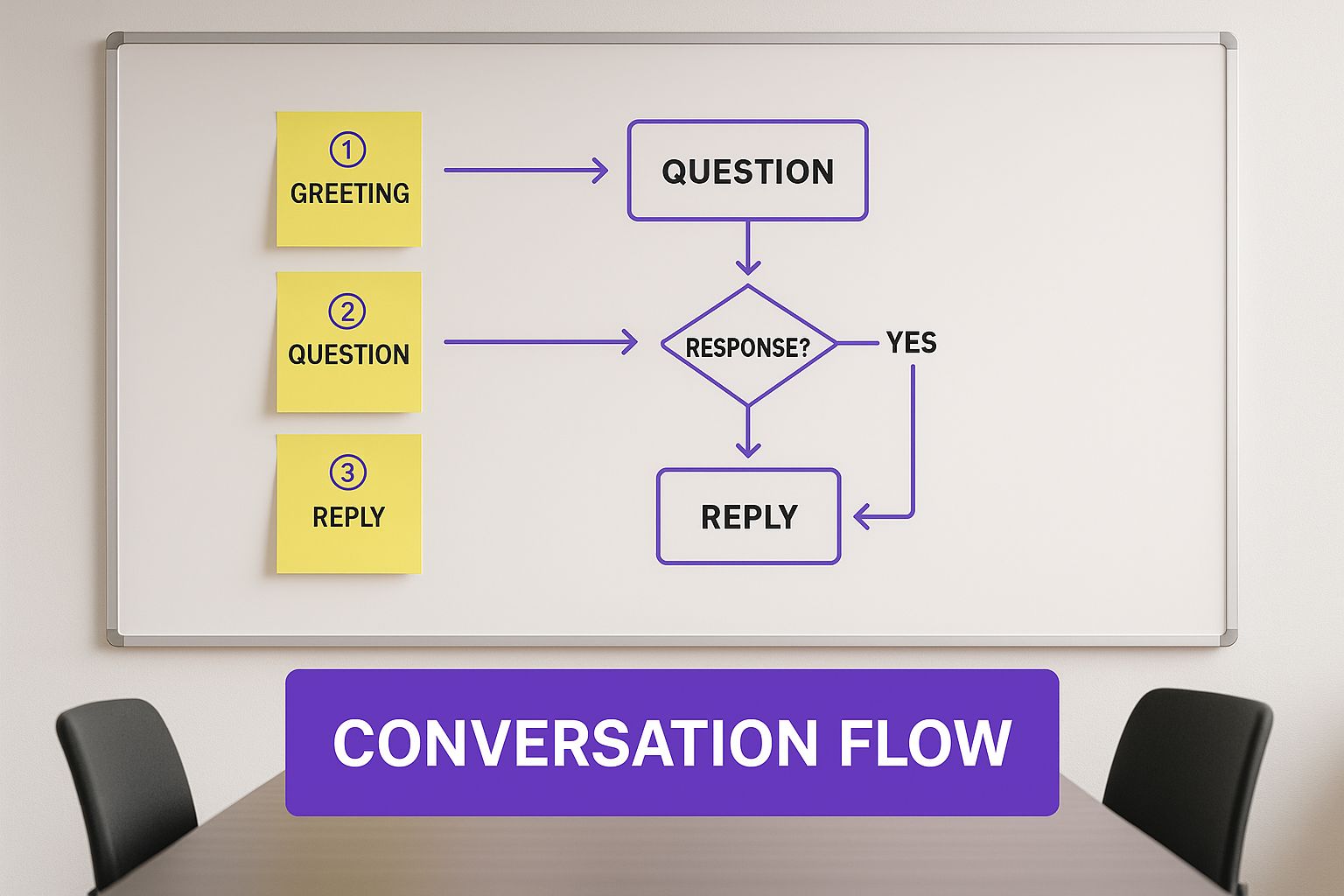
Mapping it out visually like this helps you get in the user's shoes and design a conversation that feels natural and genuinely helpful, not robotic.
As you continue to build, you’ll constantly refine its answers and teach it how to handle moments when it gets stuck. For example, if the bot doesn't have an answer, it’s much better to have it say, "I'm not quite sure about that, but I can get a human expert to help you out," rather than giving a wrong answer. This foundational training is what separates a frustrating gadget from a truly useful digital assistant. For a more detailed walkthrough, our guide on how to make a chatbot covers these mechanics in greater depth.
2. Making Your Chatbot Memorable
Having a chatbot that just works is one thing. Building one that people actually enjoy talking to? That's the real goal. This is where we move beyond just spitting out answers and start creating a chatbot that feels like a genuine part of your brand. It’s all about giving it a personality that connects with your audience from the moment they say hello.
Think about your chatbot's voice. Is it a witty sidekick, or more of a formal, helpful expert? This isn't just fluff; it sets the tone for the entire conversation. If you're running a quirky clothing store, for example, a few emojis or a funny GIF can make the chat feel alive and on-brand. A law firm, on the other hand, would want a more professional and direct tone.
Personalizing the Conversation
Little touches can have a big impact. Quick-reply buttons are a fantastic example. Instead of making someone type out a full sentence like, "I have a question about my recent order," you can offer them simple buttons like "Track My Order" or "Return Policy." It's a small change that guides the user, saves them time, and makes the whole process feel effortless.
Getting this right involves understanding the core principles of personalization, much like how Netflix seems to know exactly what you want to watch next. The idea is to make each person feel like your chatbot was built just for them.
My Two Cents: Never, ever try to trick users into thinking your chatbot is a real person. They know it’s a bot. Instead, aim for it to be an incredibly helpful, friendly, and efficient robot. Transparency is key to building trust.
Connecting Your Chatbot to Your Workflow
A chatbot on its own is helpful. But a chatbot connected to your other business tools? That’s where the magic really happens. Integrating your bot with the software you already use can automate entire parts of your business.
Here are a few game-changing integrations I’ve seen work wonders:
- Calendar Integration: Let users book appointments or product demos right in the chat. The bot checks your team's live availability, finds a slot, and sends the confirmation. No more email tag.
- CRM Connection: When a new lead gives your bot their contact info, it can instantly create a new record in your CRM. This means your sales team can follow up immediately without any manual data entry.
- E-commerce Platforms: Hook your bot into Shopify or WooCommerce. It can then pull up real-time order statuses or even act as a personal shopper, helping customers find products.
These integrations elevate your chatbot from a simple FAQ machine to a proactive assistant that gets real work done. If you want to dive deeper into perfecting these interactions, our guide on the chatbot user experience has even more advanced tips. By giving your bot a distinct personality and plugging it into your workflow, you create something that's not just useful, but truly memorable.
Taking Your Chatbot Live
You've done the hard work of building, training, and customizing your chatbot. Now for the exciting part-unleashing it on the world. Getting your bot onto your website is surprisingly simple with a tool like Whisperchat.ai. It really just comes down to pasting a small snippet of code where you want it to appear.
Whether you envision a floating widget on your e-commerce store or a bot embedded right into a landing page, the goal is to make it easy for visitors to find and use. A huge win here is how a chatbot can dramatically cut down your inbound lead response time. In my experience, responding instantly is one of the most powerful ways to turn a casual visitor into a serious lead.
Where Will Your Chatbot Live?
First things first, you need to decide where your chatbot will do its job. Your website is the obvious starting point, but don't stop there. Think about where your customers actually hang out. Whisperchat.ai gives you a few solid options.
- Website Widget: This is the classic chat bubble that floats in the corner. It's fantastic for offering general help and capturing leads from anywhere on your site.
- Embedded Iframe: For a more seamless look, you can embed the chatbot directly onto a specific page, like your support or contact page. It feels less like an add-on and more like part of the site itself.
- Messaging Apps: Consider integrating with platforms like WhatsApp or Facebook Messenger. Meeting people on the apps they already use every day is a game-changer for engagement.
Before you flip the switch, it’s also smart to think globally. The chatbot world isn't one-size-fits-all. Different regions have completely different habits. For instance, North America currently holds the biggest market share at about 31% as of 2024. But then you have the Asia-Pacific region, which accounts for a staggering 85% of all retail chatbot spending, thanks to massive smartphone adoption. You can read the full findings on chatbot market distribution to get a clearer picture.
This chart really drives the point home, showing just how differently regions adopt and spend on this tech.
Seeing this data makes it obvious: you can't just deploy everywhere and hope for the best. You have to be strategic about where your customers are.
Your Pre-Launch Checklist
Don't rush the final step. A sloppy rollout can sour a user's first impression and undo all your hard work. A little preparation goes a long way.
Pro Tip: I always recommend a "soft launch." Deploy the chatbot on a less-trafficked page first, or even make it visible only to your internal team. This lets you kick the tires in a live environment without risking a bad experience for every single customer.
Run through this quick checklist before you go live to make sure you've covered all your bases:
- Nail the Welcome Message: Is it engaging? Does it clearly explain what the bot can do? First impressions matter.
- Test Your Escalation Paths: What happens when the bot gets stuck? Make absolutely sure the "talk to a human" handoff is smooth and reliable.
- Check Brand Consistency: Do the colors, logo, and avatar all feel like your brand? It should feel like a natural extension of your company.
- Get Ready to Monitor: Have your analytics dashboard open from the moment you launch. You'll want to track conversations and spot any quick wins or problems right away.
Improving Your Chatbot Over Time

Getting your chatbot live is a huge milestone, but it's really just the beginning. The truly great chatbots I've seen aren't a "set it and forget it" project. They evolve, constantly getting smarter and more helpful based on how real people are actually using them.
This ongoing refinement is what turns a decent bot into an essential part of your team. The whole process starts with digging into your conversation logs. A platform like Whisperchat.ai gives you a clear view into what users are asking and, more importantly, where your bot is getting stumped.
Finding Opportunities in the Data
Your analytics dashboard is where the magic happens. Honestly, it’s a goldmine. The first thing I always hunt for are the "unanswered questions" or chats where the user just gave up. These aren't failures; they're your roadmap for what to do next.
Maybe you spot a dozen people asking about a new feature that isn't in your help docs yet. That’s a massive clue. Add a quick text entry or a short document covering that feature, and you've instantly solved a real problem for your next visitor.
When I review chat logs, I zero in on a few key things:
- Unanswered Queries: These are the low-hanging fruit. If ten people ask the same question your bot can't answer, that's your top priority. Group them by topic and start building out that knowledge.
- Incorrect Answers: Is the bot confidently giving the wrong answer to a certain question? You'll need to jump in and refine the source material. Sometimes, this means rephrasing a confusing FAQ or breaking a long, complicated document into smaller, more specific pieces.
- Conversation Drop-Offs: Pinpointing exactly where users abandon the conversation is crucial. It often signals a confusing bot response or an answer that didn't quite hit the mark, forcing them to look elsewhere.
My Personal Framework: I live by a simple rule: spend 80% of your time fixing the top 20% of problems. Don't get lost in the weeds trying to solve every unique, one-off issue. By focusing on the most common friction points, you’ll deliver the biggest improvement to the overall user experience.
A/B Testing and Fine-Tuning
Once you know where the problems are, you can start experimenting to find solutions. A/B testing isn't just for landing pages; it's incredibly effective for chatbots, too. You can start with something as simple as the welcome message.
For instance, you could test two different greetings to see which one gets more people to engage:
- Version A: "Hi! How can I help you today?"
- Version B: "Hi! I can help with pricing, features, or support. What are you looking for?"
Version B is often more effective because it's directive. It immediately shows users what the bot can do and guides them toward a productive conversation. You can apply this same A/B testing logic to fine-tune specific answers or even test entirely new conversational flows.
Ultimately, when you create your own chatbot, you're building a living tool. It needs regular attention, but this cycle of analyzing data, refining content, and testing your changes is what ensures your bot becomes-and remains-a valuable asset for your customers.
Frequently Asked Questions
Even with a simple, no-code tool, you're bound to have some questions when building your first chatbot. I've seen it time and time again. Getting these details right is what separates a clunky, frustrating bot from one that genuinely helps your customers and feels great to interact with.
So, let's walk through a few of the most common questions I hear from people just like you.
How Do I Make My Chatbot Sound More Human?
This is a big one. The goal isn't to fool people into thinking they're talking to a real person-always be upfront that it's a bot. The real aim is to make the conversation feel natural and helpful, not like you're just typing into a search bar.
Start by defining a clear personality. Is your brand playful? Professional? A little quirky? Infuse that voice into the bot's responses. Use a conversational tone, mix up your sentence lengths, and don't be afraid to use emojis where they make sense. Small touches like quick-reply buttons can also guide the conversation forward smoothly, making the whole interaction feel less robotic.
My Advice: Your conversation logs are a goldmine. I always tell builders to regularly check them for spots where the bot sounds stiff or overly formal. Those are your golden opportunities to refine the dialogue and inject more personality.
Can My Chatbot Handle Multiple Languages?
Absolutely. A modern platform like Whisperchat.ai is built for this from the ground up. You can easily train your bot to support different languages by feeding it separate knowledge bases.
For instance, you might upload:
- An FAQ page in Spanish
- Your product manuals in German
- Your return policy in French
The key to success here isn't just translation; it's localization. Make sure the information for each language is accurate and culturally relevant. This is how you provide a truly excellent experience for a global audience, not just a translated one.
What Is the Most Common Mistake When Building a Chatbot?
I see this all the time: trying to make the bot do everything at once. It's a classic case of ambition getting ahead of strategy. You get excited and try to build a bot that can answer every conceivable question, but what you end up with is a master of none that confuses users.
The smartest approach? Start small. Pinpoint the top 5 or 10 questions your support team gets hammered with every day. Build your chatbot to answer only those questions, and make sure it does so flawlessly. Once you've nailed that core function, you can use real user data and feedback to intelligently expand its skills over time.
Ready to build an intelligent assistant that saves you time and delights your customers? Get started with Whisperchat.ai today and deploy a custom-trained chatbot in minutes. Create your free account to see how easy it can be.