
A Hands-On Guide to Build a Chatbot from Scratch
Ready to build a chatbot? Our hands-on guide walks you through creating a custom AI chatbot that enhances customer engagement. Start building today!
Building a chatbot today isn't some complex coding project reserved for developers. It's actually straightforward: you just need your business data and a user-friendly platform like Whisperchat.ai. This no-code approach means you can get a powerful AI assistant up and running in a matter of minutes, not months.
Why a Custom Chatbot Is a Business Game-Changer
Before we jump into the "how-to," let's talk about the "why." A custom chatbot is far more than just a flashy gadget on your website. It's a strategic tool that can genuinely change how you do business and connect with your customers. We're talking about something much more sophisticated than those old-school, clunky automated responders.
Imagine cutting your customer response times down from hours to mere seconds. Think about what your team could accomplish if they weren't bogged down answering the same questions over and over. That's the real-world impact of a well-trained chatbot-it frees up your experts to tackle the complex, high-value problems that actually need a human touch.
Here’s a look at the clean, intuitive dashboard in Whisperchat.ai. This is your starting point for transforming your documents and data into a conversational AI.
As you can see, you don't need a computer science degree to get started. The entire process is designed to be simple and results-oriented.
Driving Measurable Business Results
The true value of a custom chatbot shines through in the tangible results it delivers. It essentially becomes a tireless, 24/7 team member who never takes a day off and always stays perfectly on-brand.
Chatbots have proven their worth across a wide range of industries, tackling specific challenges and driving efficiency. Here's a quick look at some of the most common applications.
Key Chatbot Use Cases by Industry
| Industry | Primary Use Case | Key Benefit |
|---|---|---|
| E-commerce | 24/7 Shopping Assistant | Guides users, answers stock questions, and processes returns, directly increasing sales and reducing cart abandonment. |
| Real Estate | Lead Qualification | Captures and qualifies potential buyers/sellers by asking key questions, scheduling viewings, and routing hot leads to agents. |
| Healthcare | Appointment Scheduling | Allows patients to book, reschedule, or cancel appointments and get answers to common administrative questions, freeing up staff. |
| SaaS/Tech | Onboarding & Tier-1 Support | Guides new users through setup and answers basic troubleshooting questions, reducing the load on the technical support team. |
These examples just scratch the surface, but they highlight how a chatbot can be tailored to solve very specific business needs, delivering a clear return on investment.
A Look at the Bigger Picture
The economic argument is undeniable. The global chatbot market exploded from $2.47 billion in 2021 and is projected to hit $15.57 billion by 2025. This incredible growth is fueled by businesses of all sizes looking to slash operational costs and reclaim thousands of labor hours.
Let's break down how this works in practice:
- For E-commerce Stores: Your chatbot acts as a personal shopper, helping visitors find the right products, checking inventory in real-time, and even suggesting complementary items. This directly impacts your conversion rates.
- For B2B Funnels: It works around the clock to qualify leads. It asks the right questions, identifies serious prospects, and can even book demos right on your sales team's calendar. For companies serious about scaling, understanding how to automate lead generation is a must, and a chatbot is a fantastic tool for the job.
- For Internal Support: Think of it as an instant resource for your employees. They can get immediate answers to HR policy questions or quick IT fixes, which boosts overall productivity.
By handling the initial wave of customer inquiries, a custom chatbot creates a more efficient and scalable support system. It’s not about replacing humans but empowering them to do their best work.
When you build a chatbot, you're not just adding a piece of tech to your site. You're creating a scalable engine for better customer satisfaction, smarter lead generation, and smoother operations.
Preparing Your Chatbot's Knowledge Base

Let's be blunt: your chatbot is only as good as the information you feed it. The knowledge base is its brain, and if you want smart, accurate answers, you have to get this part right from the start. I’ve seen it time and again-a well-prepared knowledge base is the single most important factor for a successful chatbot.
The quality of your source material has a direct, one-to-one impact on your bot's performance. You can't just throw a messy folder of random files at it and hope for the best. The real goal here is to give the AI clean, relevant, and well-structured information that it can actually understand and use to help your customers.
Choosing the Right Content
So, what should you actually put in this knowledge base? The best place to start is with the content you already use to answer your customers' most common questions. Think about the materials your team relies on every day.
Here are some of the most effective content types I've worked with:
- Detailed FAQ Pages: This is low-hanging fruit. They're already in a Q&A format, which is perfect for an AI to digest.
- Product Documentation: In-depth manuals or technical guides are goldmines for providing specific, detailed answers about your products or services.
- Internal Policy Guides: If you're building a bot for your team, things like HR policies or standard operating procedures are a fantastic foundation.
- Well-Structured Website Pages: Don't forget the basics. Your "About Us," "Services," and "Pricing" pages have all that core business info.
The rule of thumb I always follow is this: if a human can easily find a clear answer in the document, a well-trained AI can, too. The cleaner your source material, the more reliable your chatbot will be.
Common Pitfalls and How to Avoid Them
I've watched too many chatbot projects go off the rails because of poor data prep. The biggest mistake? Using old, messy, or just plain bad documents. A ten-year-old scanned PDF where you can't even select the text is a recipe for disaster. A Word doc full of tracked changes, random notes, and inconsistent formatting will just confuse the AI.
To sidestep these problems, you absolutely must take the time to clean up your content before you upload anything. Think of it as a pre-training audit; it’s not optional if you want good results. For a deeper dive, we have a complete guide on building a great chatbot knowledge base that covers more advanced tips.
Before you upload any file, run it through this quick checklist:
- Is it accurate? Get rid of old pricing, details about retired products, or outdated contact info. This is critical.
- Is it readable? The document should have clear headings, short paragraphs, and lists. If it’s a PDF, double-check that the text is actually text, not just a flat image.
- Is it simple? Cut out the jargon, internal acronyms, and conversational filler. The AI needs direct, unambiguous information to do its job well.
Putting in a little effort upfront to curate a high-quality knowledge base makes all the difference. It's the foundational work that turns your chatbot from a frustrating gimmick into a genuinely helpful tool for your users.
Let's Build Your First Chatbot with Whisperchat.ai
Alright, this is where the fun begins. You've got your knowledge base sorted, and now it's time to actually bring your AI assistant to life using Whisperchat.ai. The best part? The whole process is visual. You won't have to write a single line of code.
To make this real, let’s walk through it with a practical example. Imagine we're building a new support bot for an e-commerce store that sells custom mechanical keyboards. Our goal is to take that polished FAQ doc and our product guides and spin them into a 24/7 AI assistant. This bot will handle all the common questions about shipping, returns, and specific keyboard models, which frees up the human team for the really tricky problems.
Kicking Off Your New Chatbot Project
First things first. Log into your Whisperchat.ai dashboard and create a new chatbot project. This project is basically the home for your bot-it holds all its knowledge, settings, and personality. Think of it as giving your new AI employee its own dedicated workspace.
You’ll be asked to give your chatbot a name. For our example, we'll call it "KustomKeys Support Bot." This is mostly for you, so pick something clear and descriptive. It’s a good habit to get into, especially if you end up managing multiple bots for different parts of your business.
The initial setup is incredibly fast. In less than a minute, you have a blank canvas, ready to be filled with the knowledge you’ve put together. This is where the magic starts to happen.
The image below gives you a high-level look at the machine learning process that powers this whole thing, from data collection and training to the final evaluation.
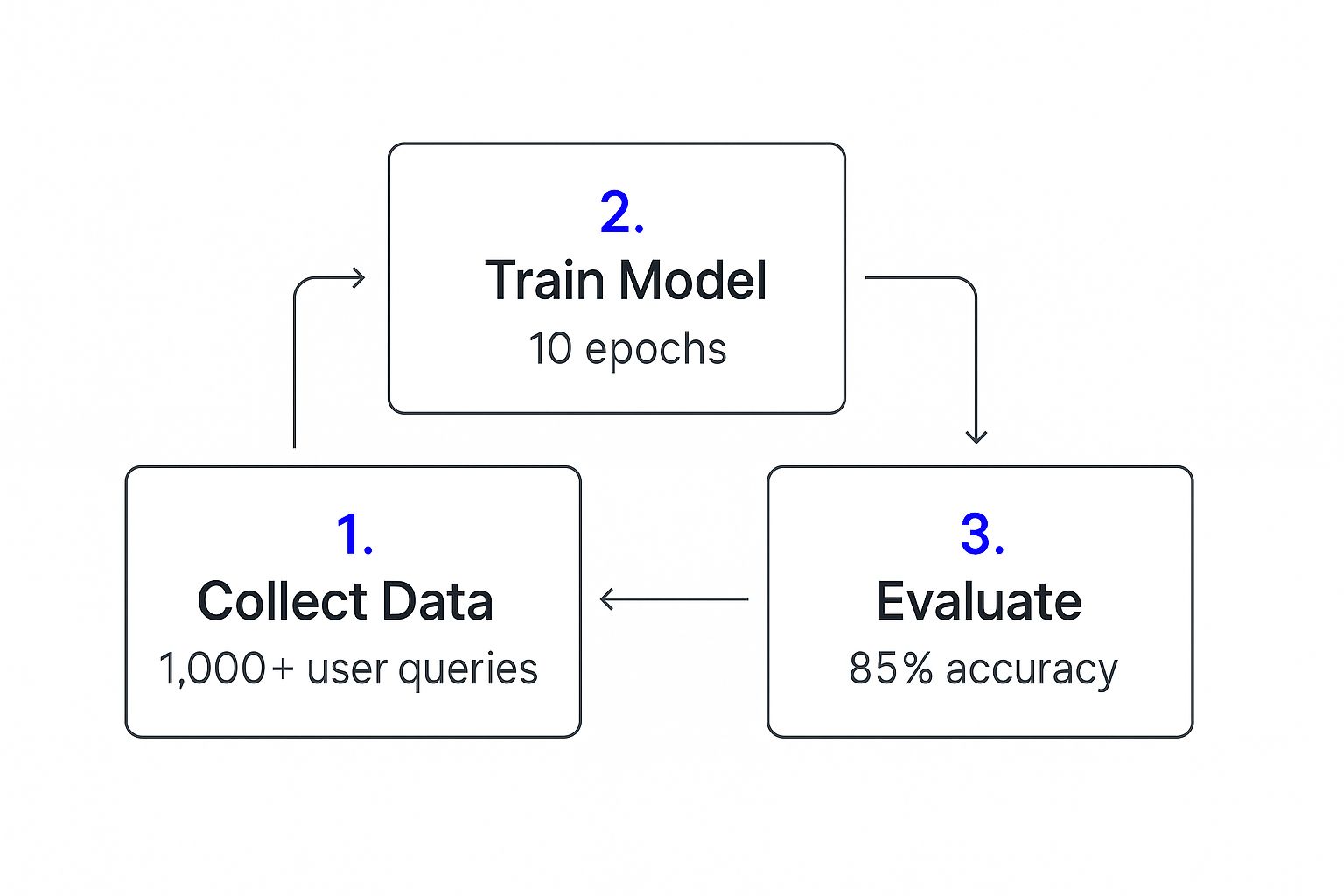
It’s a great visual for understanding how raw data gets refined into a smart, functional bot that can hit specific accuracy goals.
Feeding Your Bot Its Knowledge
With your project created, the next step is to upload your source files. This is the most critical part of the entire process, as you're literally giving the AI its brain. Whisperchat.ai is flexible here, accepting common file types like PDFs, DOCX, and TXT files.
For our "KustomKeys Support Bot," we'll upload three key documents:
- FAQs.pdf: A clean PDF with answers to the top 25 customer questions.
- Product_Specs.docx: A Word doc detailing the specs for every keyboard model.
- Shipping_Policy.txt: A simple text file that lays out all the shipping and return policies.
You just drag and drop these files right into the upload area on the dashboard. The platform gets to work immediately, breaking down the content into small, digestible chunks that the AI can understand and index for lightning-fast answers. If you want to dive deeper into the technical side of things, our guide on building a chatbot has you covered.
Training and Your First Conversation
Once your files are uploaded, all that's left is to hit the "Train Chatbot" button. This is where Whisperchat.ai does its heavy lifting, taking all the content you provided and building a private, custom AI model just for you. The process is surprisingly quick-usually wrapping up in just a few minutes.
So what’s actually happening behind the scenes? The platform is creating vector embeddings from your text. This lets the AI grasp the meaning and context behind words, not just hunt for keywords. It's the secret sauce that allows for truly smart, nuanced answers.
As soon as the training finishes, your chatbot is officially live and ready for a test drive in the platform's preview window. You can start firing questions at it right away based on the documents you uploaded.
Try asking something like, "What's the return policy for international orders?" or "Do you offer Cherry MX Brown switches?" The bot will tap into its new knowledge base and give you an instant, accurate response.
Giving Your Chatbot a Distinct Brand Personality
A chatbot loaded with a solid knowledge base is great for accuracy, but accuracy alone won't win over your customers. The real magic happens when you give your bot a personality that actually reflects your brand. This is what turns a generic, robotic assistant into a genuine extension of your team.
You don't need to be a prompt engineering wizard to pull this off. Whisperchat.ai simplifies this with a straightforward instruction box where you define your bot's character and tone. This is your chance to tell the AI how it should act.
Think about it: a law firm will want a bot that sounds professional and direct. But a creative agency? They'll probably want something witty and informal. Nailing this voice is key to keeping your brand consistent everywhere customers interact with you.
Crafting the Perfect Persona Prompt
The secret sauce here is a clear, concise base prompt. This one instruction becomes the bot's guiding star for every single response it generates. It’s the core directive that ensures every conversation fits the persona you’ve carefully defined.
I like to think of it as giving a new hire their job description and a quick rundown of the company culture. You’re setting the ground rules for how they should talk to people.
Here are a few practical examples you can borrow and tweak for your own needs:
- For a professional, direct tone: "You are a knowledgeable and formal support specialist. Your answers must be clear, concise, and professional. Do not use slang or humor."
- For a friendly, helpful vibe: "You are a cheerful and helpful assistant for our online store. Use a warm, encouraging tone. Feel free to use emojis where appropriate to seem friendly."
- For a witty, engaging personality: "You are a clever and humorous brand expert. Your goal is to be both informative and entertaining. Keep your responses short and add a touch of wit."
Your base prompt is the most powerful tool you have for shaping the user experience. A well-crafted prompt ensures every conversation reinforces your brand identity, making interactions feel authentic and engaging.
Aligning Visuals with Your Brand
Beyond what your chatbot says, how it looks is just as important for brand alignment. A chat widget that clashes with your website's design can feel jarring and, frankly, a bit untrustworthy to visitors.
Whisperchat.ai gives you simple but effective options to make the widget look like it belongs. You can quickly change the colors to match your brand palette, upload your logo right into the header, and write a custom welcome message that immediately sets the right tone.
This isn’t just about making things look pretty; it's about building trust. When the chatbot looks and feels like a natural part of your site, people are much more likely to start a conversation.
Considering Global and Regional Nuances
As you shape your bot’s personality, don't forget to think about where your audience is located. How people interact with chatbots and their communication styles can change dramatically from one region to another. For example, Asia Pacific is the fastest-growing market right now. India is projected to grow at a CAGR of 32.9% and China at 27.5%, largely thanks to massive AI investments. These figures really underscore how important it is to create interactions that are culturally relevant. You can dig into more global chatbot market trends on expertmarketresearch.com.
A joke that lands perfectly in North America might fall completely flat in Asia. By keeping your target audience in mind, you can fine-tune your bot’s personality to connect more effectively on a global scale.
Getting Your New AI Assistant Live and Ready
You've done the hard work of building your chatbot, shaping its personality, and giving it a brain full of your company's knowledge. Now for the fun part-unleashing it on your website and making sure it’s ready for prime time. This is where a good bot becomes a great one.
Putting your Whisperchat.ai assistant on your site is refreshingly straightforward. You don't need to be a developer or mess with complicated code. Whisperchat gives you a simple snippet of JavaScript. Just copy that and paste it into your website’s HTML, typically right before the </body> tag closes. That’s it. The chat widget will pop right up.
A Smarter Way to Test Your Bot
With the widget live, the temptation is to just start firing random questions at it. But a little structure here goes a long way. Before you tell the world about your new assistant, you need to put it through a proper boot camp to iron out any kinks.
The best place to start? Your source material. Grab that list of FAQs or the documents you uploaded and turn them into a testing checklist. Go through and ask every single question. This creates a solid baseline to confirm the bot actually learned what you taught it.
- Check for Accuracy: Does it get the details right? If your policy is a 30-day return window, the bot needs to say 30 days, not "about a month." Precision is key.
- Verify the Vibe: Does the response match the personality you set up? A "friendly and casual" bot shouldn't sound like a legal document. The tone has to be consistent.
- Test for the Unknown: Try asking questions you know for a fact aren't in the knowledge base. A well-behaved bot should say something like, "I'm not sure about that, but I can connect you with someone who can help." It should never invent an answer.
Testing isn't just about finding what's broken. It's about understanding how your bot thinks. This process shows you which documents are working well and which ones might need to be clearer or more detailed.
Bringing in Real-World Testers
Once you've done your own internal audit, it's time to get some fresh eyes on it. Grab a few colleagues or a couple of trusted customers and ask them to interact with the bot naturally. They'll ask questions you never would have thought of, and their perspective is pure gold.
For a deeper dive into this phase, our guide on how to implement a chatbot has some great tips for gathering user feedback.
Tell your test group to be tough. Encourage them to ask weird, complex, or multi-part questions to see how the bot handles pressure. Collect every piece of feedback-every awkward response, every time it got confused, every piece of praise. Use these insights to make those final polishes to your knowledge base and prompts. Soon enough, you'll have an AI assistant that's not just live, but truly helpful and reliable.
Got Questions About Building Your First Chatbot?
Diving into a new project, even with a user-friendly tool, always brings up a few questions. It’s completely normal. Let's walk through some of the most common things people wonder about before they build their first chatbot. I want to clear up any hesitation so you can feel confident hitting the ground running.
We’ll tackle the big ones: how much tech know-how you actually need, what kind of information makes for a smart bot, and how you can be sure it's actually doing its job well.
How Much Technical Skill Do I Really Need?
Honestly, next to none. The whole point of no-code platforms like Whisperchat.ai is to open this technology up to everyone-business owners, support leads, marketers-not just developers. If you can handle uploading a file and clicking through a settings menu, you’re already overqualified.
The entire experience is visual. You won't be staring at lines of code, wrestling with server configurations, or trying to figure out cryptic error messages. Your energy goes exactly where it should: into curating great information so your bot can be genuinely helpful.
What Kind of Data Gets the Best Results?
The best fuel for your chatbot is the content you’re already using to help your customers. Think about your most detailed FAQ pages, in-depth product manuals, troubleshooting guides, and straightforward policy documents. That's the gold.
For the AI to really shine, the information you feed it should be:
- Current: It has to reflect your latest products, services, and policies. Outdated info is a recipe for confusion.
- Structured: Content with clear headings, lists, and a logical flow is much easier for the AI to process and learn from.
- To the point: It should answer questions directly, without a lot of marketing fluff or unnecessary background.
Clean PDFs, well-formatted DOCX files, and even simple TXT documents all work beautifully.
Success isn't a mystery; you can track it with concrete metrics. It’s not about guessing if the bot is working, but about looking at the data to see its direct impact on your operations and customer satisfaction.
How Do I Know If My Chatbot Is Working Well?
This is the most important part. You can’t just launch it and hope for the best. First, check your engagement metrics. Are people actually using it? A steady stream of conversations is the first sign you’re on the right track.
Then, you need to dig into the resolution rate. Out of all the questions asked, how many did the chatbot handle successfully on its own, without needing to pass the conversation to a human? This is a direct measure of its effectiveness and your return on investment.
Finally, nothing beats direct user feedback. A simple thumbs-up/thumbs-down option after an answer gives you immediate, real-world insight into what’s working and what isn't. This feedback is the fastest way to spot holes in your knowledge base and make your bot even better.
Ready to build a chatbot that saves you time and wows your customers? Get started with Whisperchat.ai today and launch your own AI assistant in minutes. Seriously, no coding required. Create your free account at https://www.whisperchat.ai.