
Your Guide to a Documentation Management System
Discover how a documentation management system transforms your business. Our guide covers features, benefits, and choosing the right solution for growth.
A documentation management system (DMS) is far more than just a digital filing cabinet. It’s a sophisticated software system designed to handle the entire lifecycle of your business documents-from creation and organization to secure storage and instant retrieval. Essentially, it acts as a central, intelligent library for all your company's critical information, replacing the old chaos of paper files and scattered digital folders.
What Is a Documentation Management System?
Picture your daily work without the frantic search for a misplaced contract, an outdated procedure manual, or a lost invoice. That’s the reality a documentation management system delivers. It goes way beyond simple cloud storage platforms like Google Drive or Dropbox by adding powerful layers of control, automation, and intelligence to how your documents are managed.
Think of it as a dedicated digital librarian for your business. It doesn't just shelve your documents; it knows who created them, which version is the most current, who has permission to access them, and exactly how to find them in seconds. This structured approach is no longer a luxury-it's a necessity for any modern business focused on efficiency and security. To get a deeper look at the benefits, check out this comprehensive guide on maximizing efficiency with a Document Management System.
The Shift from Paper Chaos to Digital Order
The journey from a paper-based system to a DMS is a fundamental shift in how a company functions. It's not just about "going paperless." It’s about transforming your information from a logistical headache into a powerful, accessible asset that drives your business forward.
The market growth tells the story. In 2024, the global DMS market was valued at a massive $8.96 billion and is expected to climb to $10.15 billion in 2025. This surge is a direct result of businesses embracing digital-first strategies and facing stricter regulatory demands.
The difference between the old way and the new way is staggering.
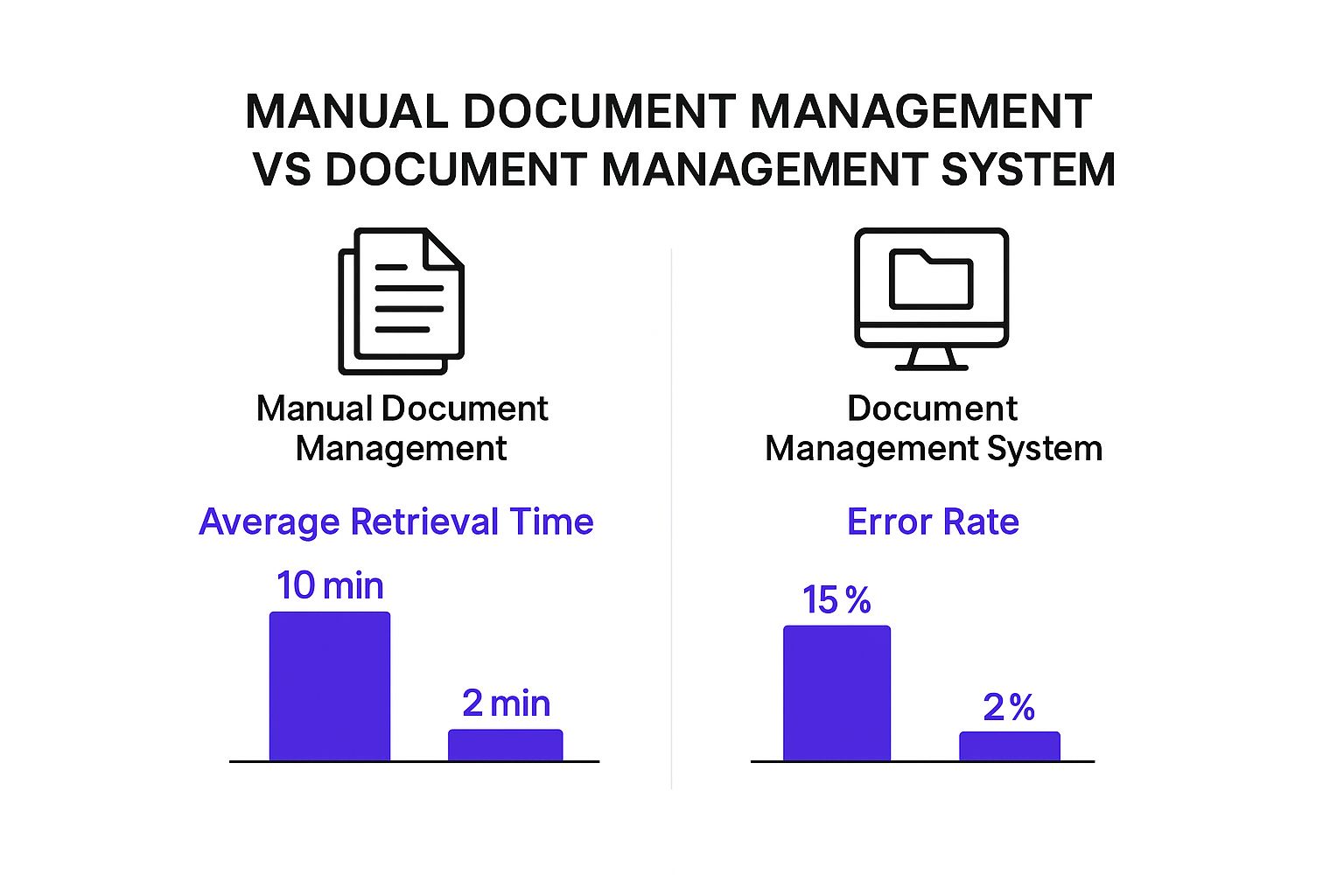
As you can see, a DMS doesn't just make things a little faster; it drastically cuts down the time spent searching for information and virtually wipes out the costly errors that plague manual systems.
Traditional vs Digital Document Management
To really grasp the difference, let's compare the old-school approach with a modern DMS. The table below breaks down how each one stacks up in key areas.
| Feature | Traditional Paper System | Documentation Management System (DMS) |
|---|---|---|
| Accessibility | Limited to physical location; slow manual retrieval. | Instant access from anywhere, anytime, on any device. |
| Security | Vulnerable to physical theft, damage (fire, flood), and unauthorized access. | Robust security with encryption, access controls, and audit trails. |
| Cost | High costs for printing, storage (file cabinets, office space), and manual labor. | Lower operational costs; eliminates paper and physical storage needs. |
| Efficiency | Inefficient; prone to misfiling, document loss, and version confusion. | Highly efficient with automated workflows, version control, and powerful search. |
The takeaway is clear: while traditional systems are static and costly, a DMS provides a dynamic, secure, and cost-effective foundation for managing your most important asset-your information.
Why It's About More Than Just Storage
A true documentation management system isn't a passive tool; it plugs directly into your business workflows and becomes an active part of your daily operations. It establishes the critical guardrails for security and compliance that you simply don’t get with basic cloud storage. For a practical example, you can see how we use structured information in our own helpful internal documentation.
A DMS transforms documents from static files into dynamic assets. It ensures the right person has the right version of the right document at the right time, every time.
By centralizing all your information and applying intelligent rules, a DMS delivers some game-changing advantages:
- Enhanced Security: Set granular access controls to protect sensitive data. You decide exactly who can view, edit, or share specific documents.
- Improved Compliance: A full audit trail tracks every single action taken on a document, making it much simpler to adhere to industry regulations like HIPAA or GDPR.
- Increased Efficiency: Stop wasting time on administrative busywork. Advanced search and automated workflows let your team find what they need in seconds.
- Better Collaboration: Version control puts an end to the confusion of working on outdated files, ensuring everyone is on the same page.
Exploring Core DMS Features and Capabilities

Sure, any basic cloud storage can hold your files. But a true documentation management system does so much more. It’s equipped with a set of interconnected features that fundamentally change how you interact with your company’s information. Think of it less like a digital filing cabinet and more like an intelligent, active assistant for your entire team.
These core features are what turn a simple storage solution into the engine that powers real efficiency, tightens security, and keeps you compliant. To pick the right system, you need to know what to look for. Let’s break down the essential capabilities that make a DMS truly effective.
Precise Version Control and History
We’ve all been there-staring at a folder with files like "Final_Report_v2.docx" and "Final_Report_v3_NEW.docx," wondering which one is actually the final version. It’s a common and frustrating waste of time. A good DMS eliminates this chaos with version control.
This feature automatically tracks every single change made to a document, creating a clean, sequential history. Instead of a mess of conflicting copies, the system keeps one master file with a complete log of every past state.
This gives you the power to:
- Instantly know you're looking at the most current version.
- See a full audit trail of edits, showing who changed what and when.
- Roll back to a previous version if someone makes a mistake.
Imagine a legal team working on a contract. With versioning, they can see every single revision made during negotiations, guaranteeing they aren't working from an outdated draft. Version control provides that critical single source of truth.
Advanced Search and Instant Retrieval
Trying to find one specific document in a mountain of files can feel like searching for a needle in a digital haystack. This is where the powerful search capabilities of a documentation management system become a lifesaver, going far beyond just looking at filenames.
Modern systems use metadata-think of it as descriptive tags about a document, like its author, creation date, or client name-to make finding things incredibly fast and precise. You’re not just searching for words inside the file; you're searching based on its context.
A DMS with advanced search turns your entire document repository into a queryable database. Finding the right information becomes a matter of seconds, not minutes or hours.
This is a huge productivity boost. An HR manager can instantly find all onboarding paperwork for employees hired in the last quarter. An engineering team can pull up every schematic for a specific product with one simple query. Many top-tier systems are now even integrating artificial intelligence, like AI-powered document understanding with Docsbot AI, to make search and content analysis even smarter.
Granular Access Controls and Security
In a DMS, security isn't just an add-on; it's baked into the very foundation of the system. The best platforms offer granular access controls, giving you the ability to define exactly who can see, edit, or share specific documents and folders.
This precise level of control is absolutely essential for protecting sensitive data and maintaining compliance. You can tailor permissions to fit user roles, departments, or even individuals.
Typically, these controls let you manage:
- View-only access for people who just need to read information.
- Editing rights for team members who are actively collaborating.
- Sharing permissions to control who can send files outside the company.
- Deletion restrictions to prevent critical records from being accidentally or maliciously removed.
This is how you ensure confidential financial reports are only seen by the finance team and that private client information stays protected. It’s a meticulous approach that minimizes risk and puts you in complete command of your data.
The Real Business Benefits of Using a DMS

Bringing a documentation management system into your business isn't just a simple IT upgrade. It’s a strategic move that delivers real, measurable value across the board. While the "go paperless" angle is a common starting point, the true advantages go much deeper, touching everything from your bottom line to how you manage risk.
Think of a modern DMS as the central nervous system for your company's information. It provides the backbone for huge improvements in how your teams work, stay secure, and collaborate. Let’s break down the tangible benefits that build a powerful case for making the switch.
Strengthen Security and Simplify Compliance
In an era of tight data privacy rules and constant cyber threats, keeping sensitive information safe is non-negotiable. A DMS acts like a digital fortress for your most important files, leaving the risks of unlocked filing cabinets and messy shared drives behind. Features like encryption and granular access controls give you surgical precision over who can see, edit, or share specific documents.
This control is also your best friend when it comes to regulatory compliance. Whether you're navigating GDPR, HIPAA, or other industry standards, a DMS streamlines the entire process. It automatically creates an unchangeable audit trail, logging every single action taken on a document-from a simple view to a major edit or deletion.
A documentation management system doesn't just store documents; it actively enforces your security and compliance policies, turning regulatory requirements from a burden into a manageable, automated process.
When auditors come knocking, this detailed log provides instant proof of compliance, saving you from panicked searches and the risk of hefty fines. You get peace of mind knowing your data is locked down and handled by the book.
Boost Efficiency and Slash Costs
One of the first things you'll notice after implementing a DMS is the dramatic jump in operational efficiency. We've all been there-wasting precious time just looking for a file. Studies show knowledge workers spend a huge chunk of their day simply searching for information. A DMS gives that time back by making every document findable in an instant.
Instead of wading through confusing folder structures or old email threads, employees can use advanced search to pull up the exact file they need in seconds. This speed has a direct and positive impact on your budget.
- Reduced Labor Costs: When your team spends less time on administrative busywork like filing and searching, they can focus on what they were hired to do.
- Lowered Physical Storage Costs: Saying goodbye to paper files means reclaiming expensive office space and cutting costs on ink, toner, and storage furniture.
- Minimized Errors: Version control and automated workflows nearly eliminate costly mistakes that happen when people accidentally use outdated information.
This shift isn't just a niche trend. A 2023 Eurostat report found that 42.5% of EU enterprises now rely on cloud services for essentials like file storage, a major increase from the year before. This shows just how critical centralized information has become for modern business.
Foster Seamless Collaboration
A DMS is designed to tear down information silos and create a single, unified space where teamwork happens. When all your documents live in one central hub, everyone is working from the same playbook. Version control is a game-changer here, ensuring that nobody is accidentally editing an old draft and wiping out a colleague's work.
This is especially vital for today's remote and hybrid teams, allowing them to work together in real-time without the usual friction. Imagine several people reviewing a proposal at once, with every comment and change tracked in one place. The system maintains a single source of truth, no matter where your team members are logging in from. In many ways, this reflects the core principles of great https://www.whisperchat.ai/blog/customer-service-knowledge-management, where consistent, accurate information is the key to success.
How Different Industries Use a DMS
A documentation management system isn't some generic, one-size-fits-all piece of software. Its real value shines when you see how it’s adapted to solve very specific, industry-level problems. It's one thing to talk about features in theory, but it's another to see how those features become practical, problem-solving tools in the real world.
Think about it: core functions like version control and secure access are applied in vastly different ways to meet unique operational and regulatory demands. For a law firm, it's about protecting client confidentiality. For a manufacturing plant, it's about ensuring production quality. In each case, a DMS acts as the backbone for information integrity, providing the structure needed in high-stakes environments where getting the details right is non-negotiable.
Let's dive into how a few key industries put this technology to work.
Legal Firms Managing Complex Cases
For anyone in the legal field, documents are the lifeblood of the practice. Every case file, contract, piece of discovery, and client email is a critical asset that demands absolute precision and security. A single misplaced file or an old version of a contract can create massive legal and financial headaches.
This is exactly the kind of high-stakes environment a documentation management system is built for. It provides features that are absolutely essential for modern legal work:
- Immutable Audit Trails: The system tracks every single touchpoint on a document-who saw it, who changed it, and when. This creates a rock-solid, defensible record for compliance checks or court proceedings.
- Strict Access Controls: Legal teams can get incredibly specific with permissions, ensuring only authorized people can access sensitive case files. This is fundamental to protecting client confidentiality.
- Matter-Centric Organization: Instead of digging through messy, disconnected folders, documents are organized by case or client matter. Finding every related file becomes an instant, frustration-free task.
For a law firm, a DMS is more than just organization; it's a risk management tool. It ensures that every piece of evidence and every contract is version-controlled, secure, and fully auditable, which is fundamental to the practice of law.
Healthcare Providers Protecting Patient Data
The healthcare industry is governed by some of the planet's strictest data privacy regulations, especially the Health Insurance Portability and Accountability Act (HIPAA). Managing patient records, lab results, and billing information securely isn't just good practice-it's the law.
A DMS is a cornerstone technology for healthcare organizations trying to stay compliant and deliver better care. It creates a secure, central hub for all patient-related documents. This means doctors and nurses can pull up a complete patient history quickly and safely, which naturally leads to better-informed decisions. Plus, the system’s role-based access guarantees only authorized medical staff can view protected health information (PHI), dramatically lowering the risk of a data breach.
Manufacturing and Engineering Precision
In the world of manufacturing, precision is everything. Documents are the blueprints for production, from the initial schematics and technical drawings to quality control logs and safety procedures. An error stemming from an outdated drawing or an incorrect checklist can grind production to a halt, trigger expensive recalls, or even cause safety incidents.
This is where a documentation management system ensures the entire production line is working from a single source of truth.
- Version Control for Schematics: Engineers never have to second-guess if they're using the latest approved drawing. This alone prevents countless costly manufacturing mistakes.
- Streamlined Quality Control: QC checklists and reports are digitized, time-stamped, and stored in one place. This creates a transparent and easily accessible record of every quality check.
- Controlled Document Distribution: When a safety protocol or standard operating procedure (SOP) is updated, a DMS pushes it out to the factory floor instantly, keeping every worker informed and safe.
By putting a DMS in place, manufacturers gain tighter control over their processes, slash the risk of human error, and build a complete, auditable history of their entire production lifecycle.
Choosing the Right Documentation Management System
Picking a new documentation management system is a big deal. This isn't just another software purchase; it's a decision that will echo through your entire organization, shaping daily productivity and long-term security. The right system can become a genuine operational advantage, but the wrong one can just introduce new frustrations and slow everyone down.
To make the right call, you need to go beyond a simple feature list. It's about finding a tool that genuinely clicks with your team, your existing workflows, and, of course, your budget. Let's walk through how to approach this so you can find the perfect DMS for your company.
Start by Assessing Your Needs
Before you even glance at a single vendor's website, you have to look inward. A successful DMS project is built on a solid foundation of self-awareness. What problems are you actually trying to fix here?
Start with some practical questions:
- Document Volume: How many documents are we talking about? A small shop managing a few hundred contracts has vastly different needs than a large corporation processing thousands of invoices every day. And how fast is that number growing?
- Workflow Complexity: Are your processes straightforward, like a simple "review and approve" loop? Or are you dealing with intricate, multi-stage workflows that need branching logic and input from lots of different people?
- Your Users: Who is actually going to be using this thing day in and day out? You need to be honest about their technical comfort level. A system is useless if it's too complicated for your front-line staff, no matter how powerful it is for the admins.
The move from paper to digital has taught us time and again how vital this initial homework is. Take a government's Central Bank System, for example, which had to transition to an online platform to manage 3,000 annual financial disclosures. Its success hinged on far more than just buying software. The project demanded meticulous planning, changes to legislation, and thorough training for everyone involved. As this public sector case shows-which you can read about in this government digitization project overview with its initial $20,000 design cost-the human and process side of things is just as critical as the technology itself.
Cloud vs. On-Premise Deployment
One of the first forks in the road you'll encounter is where your documentation management system will actually "live." The choice between a cloud-based (SaaS) platform and an on-premise one has huge implications for cost, security, and accessibility.
Cloud-Based DMS With a cloud solution, the vendor hosts everything, and you access it through your web browser. This model has become the default for a reason-it’s flexible and doesn’t require a massive upfront investment.
- Pros: Lower initial cost, no servers for you to maintain, accessible from anywhere with an internet connection, and updates happen automatically.
- Cons: You need a reliable internet connection, you'll be paying a recurring subscription fee, and you have less direct control over where your data is stored.
On-Premise DMS An on-premise system is the traditional approach: you install the software on your own servers and your own IT team manages it. This gives you the ultimate control over your environment.
- Pros: Total control over your data and security, it’s a one-time purchase (plus maintenance), and it works even if your internet goes down.
- Cons: A much higher upfront cost for hardware and software licenses, and you need a dedicated IT team to handle maintenance, security, and updates.
Core Evaluation Criteria Checklist
Once you've got a good grasp of your needs and which deployment model makes sense, it's time to start looking at vendors. Use this checklist as a guide to compare your options and make sure you don't miss anything important.
- Integration Capabilities: How well does it play with the other tools you already rely on? A DMS that can't talk to your CRM, ERP, or accounting software will just create isolated data silos, which is exactly what you're trying to avoid.
- User-Friendliness: Is the interface actually intuitive? A clunky, hard-to-use system will suffer from poor adoption, completely undermining the investment. Always insist on a live demo, and better yet, have a few of your team members try it out themselves.
- Vendor Support and Training: What's the plan for when things inevitably go sideways? Good vendors provide excellent customer support and have a library of training resources to get your team up and running smoothly.
- Scalability: Can this system grow with you? You need a platform that can handle more documents and more users down the road without grinding to a halt.
Best Practices for a Successful DMS Rollout

Getting your hands on a powerful documentation management system is one thing, but making it work for your team is another challenge entirely. The real win comes from a thoughtful, well-planned rollout. If you rush it or just "wing it," you're setting yourself up for low adoption, frustrated employees, and a pricey piece of software that nobody uses.
To really nail the launch, you need to think beyond the tech. A great rollout is as much about people and process as it is about the software itself. It takes solid planning, clear communication, and a genuine effort to make the switch as painless as possible for everyone involved.
Plan Your Implementation Meticulously
Before you even think about moving a single file, you need a rock-solid implementation plan. This is your project blueprint. It needs to map out the scope, set honest timelines, and make it crystal clear who on the project team is responsible for what.
Your plan should tackle the big questions right away:
- Who's leading the charge? Put one person in charge to own the project and keep the momentum going.
- What does a "win" look like? Define concrete, measurable goals. Think in terms of reducing document search time by 50% or hitting a 90% user adoption rate in the first three months.
- Who are your champions? Find enthusiastic users in each department who can get others on board and act as a source of valuable feedback.
A detailed implementation plan acts as your North Star. It keeps the project on track, ensures everyone knows their role, and transforms a complex undertaking into a series of manageable steps.
Prioritize Change Management and Training
Let's be honest: the biggest hurdle you'll face isn't the software, it's getting people to change their habits. If your team doesn't get why you're making a change or how to use the new DMS, they'll inevitably slip back into their old, messy ways. This is exactly why change management and training are non-negotiable.
Start talking about the new system early and keep the conversation going. Frame the benefits in terms your team cares about-less time digging for files, smoother collaboration, and fewer mix-ups. When you get closer to launch, roll out hands-on training that’s actually relevant to different roles. Your power users will need a deep dive, but most of your staff might just need the basics to get started. The aim is to build confidence and excitement right from the get-go.
Develop a Logical Data Migration Strategy
Moving all your existing documents into the new system is a massive-and often intimidating-part of the process. A simple "drag and drop" of all your old files will just transfer the chaos into your shiny new system. You need a smart strategy.
First, take a hard look at your current documents. This is the perfect chance to finally archive or securely get rid of all that outdated and irrelevant stuff cluttering up your servers. For everything you decide to keep, you'll need a clear process for scanning paper files and importing your digital ones.
From there, it's crucial to build your organizational framework before you migrate anything. This involves three key pieces:
- A Universal Folder Structure: Design a single, logical folder hierarchy that everyone in the company will use.
- A Consistent Naming Convention: Create simple, easy-to-follow rules for how every file should be named.
- A Standardized Metadata System: Decide on the essential tags (like Client Name, Project ID, Document Type) that will be applied to every document, making search a breeze.
Setting up this foundation first ensures your new DMS is tidy, searchable, and effective from day one. During big transitions like this, fielding employee questions can be a job in itself. Many companies are finding AI can help, so it might be worth exploring how to automate customer support to handle those common internal queries.
Answering Your Lingering DMS Questions
Even after you've got a good handle on what a documentation management system is, a few practical questions always seem to pop up. It's completely normal. You're thinking about how this would actually work for your business, day in and day out.
Think of this as tying up the loose ends. We'll tackle the most common "what if" scenarios that people run into when they're considering a DMS.
Isn't This Just a Fancy Version of Cloud Storage?
This is easily the most common question, and it's easy to see why. At first glance, a DMS looks a lot like Google Drive or Dropbox-they all store your files, after all. But that’s where the comparison ends.
Think of cloud storage as a digital filing cabinet. It’s a great place to put your files, organize them into folders, and maybe share access with a coworker. It's fundamentally a passive storage space.
A documentation management system, however, is more like an intelligent, automated office manager. It doesn’t just hold your documents; it actively manages the work that revolves around them.
- Intelligent Workflows: It can see an incoming invoice, know it needs approval, and automatically send it to the right person in accounting.
- True Version Control: It prevents the classic nightmare of having three different versions of a proposal saved in three different places, ensuring everyone is always working from the correct one.
- Complete Audit Trails: For compliance or just plain security, it keeps a detailed log of who accessed, edited, or shared a document, and when.
The bottom line is this: Cloud storage is for storing files. A DMS is for managing the business processes that use those files.
What Do We Do with All Our Existing Paper Files?
The thought of tackling decades of paper records in dusty file rooms is often enough to make anyone hesitant. The sheer volume can feel overwhelming, but the trick is to be strategic. You don't have to boil the ocean.
Start with the documents you use every day. Focus on digitizing your active files first-the current contracts, recent invoices, and ongoing project plans. This gets your team working more efficiently right away.
Older, archival documents can be scanned later, either in batches over time or simply on-demand when someone requests one. Many companies find it's well worth the investment to hire a professional scanning service to handle the initial bulk conversion. They can knock it out far faster and often with better accuracy than you could internally.
How Long Does It Actually Take to Get a DMS Set Up?
The rollout timeline really depends on the size of your company and the complexity of what you need the system to do. It’s not a one-size-fits-all answer.
- Small Businesses (1-10 people): With a modern, cloud-based DMS, you could be up and running in just a few days or a week or two. The focus is usually on basic setup and getting the team comfortable.
- Mid-Sized Companies (11-100 people): A more realistic timeline here is between one and three months. This accounts for more detailed planning, migrating more data, and proper training for different departments.
- Large Enterprises: For big organizations with thousands of users, custom workflows, and integrations with other core systems (like an ERP or CRM), implementation can easily take six months or more.
Ready to bring intelligent, automated support to your own website? With Whisperchat.ai, you can build a custom AI chatbot trained on your documentation in minutes, with no coding required. Start your free trial today and see how easy it is to deploy.