
A Guide to Modern Chat Bot Design
Discover how to master chat bot design with proven strategies. Learn to build conversational experiences that engage users and drive results.
Effective chatbot design doesn't start with code or dialogue flows. It begins with a single, clear mission. Before you write a single line of conversation, you have to nail down the specific problem your chatbot is going to solve. This is the bedrock of your project, ensuring you build a bot that provides real value, not just a flashy gadget that annoys your customers.
Defining Your Chatbot's Core Purpose
Jumping straight into development without a solid plan is a recipe for disaster. I've seen it happen time and again. You end up with a clunky, confusing bot that doesn't actually help anyone. A successful chatbot is a tool built with intention-designed from the ground up to hit specific, measurable business goals.
The biggest mistake you can make is trying to build a bot that "does everything." This always leads to a muddled user experience and a bot that fails at all its tasks. Instead, zoom in on one primary function. What is the single most important thing you need this bot to do?
Think about common pain points a bot can realistically solve:
- Slash Support Ticket Volume: Can it handle the flood of repetitive questions (FAQs) so your human agents can tackle the tough stuff?
- Qualify Sales Leads: Could it engage visitors, ask the right qualifying questions, and book meetings for your sales team, even after hours?
- Guide New Users: Can it walk new customers through your software, pointing out key features to get them up and running faster?
- Drive Ecommerce Sales: Can it act as a virtual shopping assistant, offering product recommendations and answering questions that lead to a sale?
Set Goals You Can Actually Measure
Once you have that primary function, you need to define what success looks like in plain numbers. Vague goals like "improve customer satisfaction" are useless here. You need specific, quantifiable Key Performance Indicators (KPIs).
For example, if you want to reduce support tickets, a concrete goal is: "Decrease incoming support emails by 30% within the first quarter." For lead generation, it might be: "Capture 50 qualified leads per month directly through the chatbot." These metrics give you a clear yardstick to judge your bot's performance.
Before you go any further, it's crucial to lay out these foundational elements. Think of this as your strategic blueprint.
Essential Elements of Chatbot Strategy
This table outlines the foundational components to establish before you begin designing and building your chatbot.
| Component | Key Questions to Answer | Example Outcome |
|---|---|---|
| Primary Goal | What is the #1 problem we are trying to solve? What is the most important task for the bot? | To reduce repetitive support inquiries about order status and shipping policies. |
| Target Audience | Who will be using this chatbot? What are their technical skills? What do they already know? | Existing e-commerce customers who have recently placed an order. They are typically non-technical. |
| Success Metrics (KPIs) | How will we measure success? What specific numbers will tell us if the bot is working? | Decrease "Where is my order?" tickets by 40%. Achieve an 85% successful resolution rate within the bot. |
| Key Information Source | Where will the bot get its information? (e.g., knowledge base, API, specific documentation) | The bot will pull data directly from our Shopify API for real-time order tracking. |
Getting these answers down on paper turns a vague idea into an actionable plan.
A chatbot without clear metrics is just a guess. To create an effective tool, you have to know how you'll measure its impact from day one. This turns your chatbot from a potential expense into a strategic investment.
Understanding the History and Modern Use Cases
Conversational AI isn't some new fad. Its story actually starts back in 1966 with ELIZA, a program from MIT professor Joseph Weizenbaum designed to simulate a psychotherapist. It was a simple pattern-matching experiment, but it cracked open the door to human-computer conversation and set the stage for the powerful tools we have today, from Siri to ChatGPT.
Today’s applications are far more specialized and results-driven. As you define your chatbot's purpose, look at how others are using them to get real business results, like the many examples of AI chatbots for ecommerce.
Seeing these specific use cases in action helps you narrow your own bot's mission to something achievable and genuinely impactful. This focus is the key. It will guide every other decision you make, from crafting its personality to mapping out its conversational logic.
Crafting Natural and Engaging Dialogue

Alright, you've defined your chatbot's purpose. Now for the fun part-giving it a voice. This is where your bot stops being a piece of software and starts feeling like a helpful assistant. The dialogue is the user interface, and getting it right is what separates a genuinely useful tool from a frustrating gimmick.
It all begins with personality. I'm not talking about creating a wacky character with forced jokes. It's about defining a consistent voice that reflects your brand. Is your business buttoned-up and professional? Or is it more casual and friendly? The answer dictates everything from the bot’s name and tone to the words it uses. A chatbot for a law firm and one for a trendy sneaker shop should feel worlds apart.
Building Your Bot’s Persona
A well-defined persona makes the user experience predictable and comfortable. It's the foundation of a good conversation. The goal isn't to distract the user, but to make the interaction feel cohesive and distinctly yours.
Think about these core building blocks for your bot's identity:
- Name: Keep it simple and memorable. A name should hint at its function. "OrderBot" is crystal clear, while something more creative might work for a lifestyle brand.
- Tone of Voice: Is the language formal or informal? Witty or straight-to-the-point? This should echo the copy on your website and in your marketing to create a seamless brand experience.
- Avatar: A visual cue, even a simple one, helps humanize the interaction. This could be your company logo, an abstract icon, or a friendly illustration.
For instance, a Whisperchat.ai bot for a B2B software company would likely adopt a professional tone with clear, direct language. On the other hand, an e-commerce bot might use enthusiastic phrasing and even an emoji or two to guide shoppers. Consistency is the name of the game.
The Critical First Impression: The Welcome Message
The very first thing your chatbot says is arguably its most important line. It’s your one chance to set the stage, manage expectations, and show the user exactly what to do next. A vague or unhelpful welcome message is a recipe for instant confusion and a bounced user.
A powerful welcome message has to do three things immediately:
- Introduce itself and its purpose.
- State what it can (and can't) do.
- Prompt the user with a clear path forward.
An effective welcome message isn't just a "hello"; it's a mini user manual. It needs to immediately answer the user's unspoken question: "Okay, what can this thing actually do?"
Let's look at a real-world example of a weak vs. strong approach:
| Welcome Message Type | Example Text | Why It Works (or Doesn't) |
|---|---|---|
| Weak | "Hello! How can I help you today?" | This is far too open-ended. It forces the user to guess the bot's capabilities, which usually leads to them asking something it can't handle. |
| Strong | "Hi! I'm the Support Assistant. I can help track your order, check our return policy, or find product info. What would you like to do?" | This is perfect. It defines the bot's role and immediately gives the user clear, actionable options. The conversation is guided from the start. |
This kind of immediate clarity is a cornerstone of great chatbot design. You aren't just scripting a conversation; you're building an intuitive tool.
Designing Intuitive Conversational Flows
Once the user is engaged, the conversation has to flow. This means anticipating what they'll need and giving them simple ways to get there. Relying on interactive elements is the best way to keep the dialogue structured and moving forward.
One of the most valuable tools in your kit is quick replies. These are just pre-written response buttons that pop up after the bot asks a question. Instead of making someone type out "check my order status," you give them a button that says "Check Order Status." It's faster, eliminates typos, and keeps the user on a path to success.
Equally important is handling errors with grace. No bot is perfect. When a user asks something it doesn't understand, a dead-end response like "I don't understand" is a conversation killer. A much better approach is to be honest and helpful: "I'm not equipped to help with that just yet, but I can answer questions about orders, products, or returns. Which of those can I help you with?"
This simple redirect keeps the interaction positive and moves the user back toward something the bot can do successfully.
Alright, you've given your chatbot a personality and a voice. Now it's time to give it a brain. This is where you become the architect of the conversation, building the logical pathways that guide users from their initial question to a successful answer. If you skip this, your bot will just lead people to frustrating dead ends, leaving them stuck and annoyed.
A chatbot conversation isn't a straight line; it's more like a branching tree of possibilities. Your job is to map out every significant interaction, from simple FAQs to complex, multi-step tasks. This process is the absolute core of effective chat bot design, turning a static script into a dynamic, problem-solving tool.
Visualizing the Conversation
I've learned this the hard way: trying to map out complex chatbot interactions in a text document is a recipe for chaos. The only way to do this sanely is visually. Flowcharts or conversation trees are your best friends here, allowing you to plot the logic and see the entire conversational landscape at a glance.
Your flowchart needs to map out the key pieces of the user's journey:
- User Inputs: What are people actually going to ask or type?
- Decision Points: Where does the chat need to split based on what the user wants?
- Bot Responses: What does the bot say or show at each step?
- Action Nodes: When does the bot need to do something, like check an order status in your database?
- End Points: How does a specific conversation wrap up successfully?
This visual approach is crucial for getting the flow architecture right. The diagram below gives you a good sense of how these pieces connect.
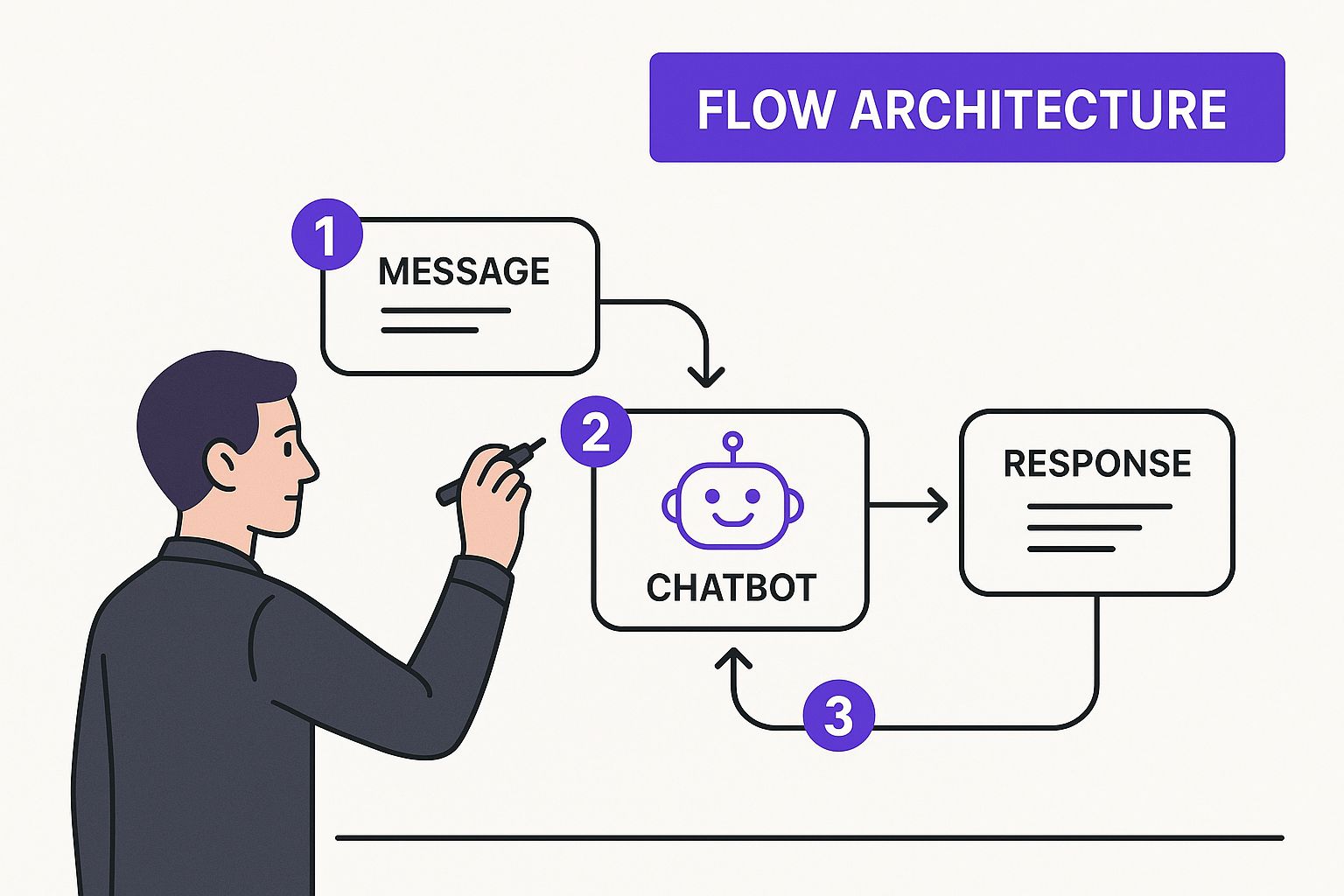
Seeing it laid out like this makes it obvious why you have to map every potential path. It’s the only way to avoid those conversational dead ends and give your users a smooth experience.
Interestingly, this idea of mapping probable paths isn't new at all. The statistical model that paved the way for modern chatbot design, the Markov chain, was introduced way back in 1906. Markov chains offered a way to predict word sequences based on probability, which was foundational for early language generation. While it's simple compared to today's AI, it established the core concept of probabilistic transitions in language-something we still rely on when mapping dialogue flows. If you're curious about the deep history, you can explore the principles in this detailed paper on language models.
Designing for the Happy Path and Edge Cases
When you start mapping, you’ll naturally focus on the "happy path." This is the ideal, straightforward route where everything goes perfectly. The user asks a predictable question, provides the correct information, and the bot solves their problem in a flash. For an e-commerce bot, the happy path is a user asking, "Track my order," giving a valid order number, and getting the shipping status instantly.
But here’s the thing about real users: they're wonderfully unpredictable. This is where designing for "edge cases" becomes the most important part of your job. Edge cases are all the messy, non-ideal scenarios that will happen. What if they mistype their order number? What if they ask about shipping to a country you don't serve? What if they use slang the bot has never heard?
A great chatbot isn't defined by how well it handles the happy path. It's defined by how gracefully it manages the unexpected. A well-designed fallback is what separates a helpful tool from a frustrating machine.
Anticipating these situations is everything. For every single step in your flow, you have to ask yourself, "What could go wrong here?" Then, you build a recovery path for it.
Building Effective Fallback Responses
When the conversation inevitably goes off the rails, your bot needs a safety net. This is where fallback responses come in. A lazy fallback is a total conversation killer-just a blunt, "I don't understand."
A good fallback, on the other hand, is much smarter. It does three things:
- Acknowledges the miss: It honestly admits it doesn’t have the answer.
- Re-orients the user: It gently reminds the user what it can do.
- Offers a clear next step: It provides quick replies or an option to talk to a person.
For example, imagine a user asks a complex billing question your bot isn't trained for. A strong fallback would be: "I'm not equipped to handle detailed billing questions just yet. I can help with order tracking or product information. Would one of those help, or would you like me to connect you with a human agent?"
This approach keeps the user from getting frustrated and ensures there's always a path forward-a true cornerstone of user-centric chat bot design.
Deploying Your Chatbot Across Platforms

Even the most brilliantly designed chatbot is a wasted effort if it’s buried on an obscure page no one ever visits. For your bot to deliver real value, it needs to show up where your customers already are. Think of deployment not as the final technical hurdle, but as a strategic decision that shapes how people find and use your bot.
The goal is to create an experience that feels completely native and consistent, whether a user is interacting with it on your website, inside your mobile app, or through a platform like WhatsApp.
This isn’t about a simple copy-and-paste job. Each platform comes with its own set of rules, user expectations, and technical quirks. A truly effective chatbot adapts its features and feel to shine in each environment, all while keeping your brand’s voice intact.
Adapting Your Design for Each Channel
While your chatbot's core logic might remain the same, the user interface and the way people interact with it have to change. A bot on a corporate website, for instance, can afford to use more screen real estate and expect a bit more of the user's focused attention. In contrast, a bot inside WhatsApp has to be quick, to the point, and built for a mobile-first world.
This idea of channel-specific adaptation really took off when messaging platforms entered the scene. When Facebook Messenger opened its platform to developers back in 2016, it changed everything. This move unlocked billions of user interactions and steered conversations toward more natural language. It also fueled the chatbot market's growth into an estimated $1.25 billion industry by 2021.
Your design absolutely must account for these platform-specific differences.
Platform-Specific Design Considerations
Deploying a chatbot isn't a one-size-fits-all process. The platform you choose dictates much of the user experience. A bot that feels perfectly at home on a website might feel clunky and out of place in a messaging app. The table below breaks down some of the key differences you'll need to consider.
| Platform | Key Design Advantage | Main Constraint/Consideration |
|---|---|---|
| Website Widget | You have complete control over branding and can embed rich media like videos or interactive product cards. | It has to compete for attention with every other element on your website. |
| Mobile App | It can integrate deeply with app functionality, like pulling up order details or accessing user account info directly. | The interface is much smaller, which means you need shorter messages and larger, easy-to-tap buttons. |
| WhatsApp/Messenger | Users are already highly engaged and familiar with the interface, which often leads to quicker adoption. | The feature set is more limited. You’re mostly working with text, quick replies, and simple media-no custom UI. |
Ultimately, adapting your design to these small but crucial nuances is what separates a helpful chatbot from an annoying one. On your website, you might present a product with a detailed card and a "Buy Now" button. But on WhatsApp, that same interaction would be better served by a simple product image and a quick reply button that says, "Tell Me More."
Connecting Your Bot to Your Business Systems
A chatbot's real intelligence isn't just in what it says, but in its ability to access and use real-time information. This is where Application Programming Interfaces (APIs) come in. Think of an API as a secure bridge that lets your chatbot communicate with your other business software.
This connectivity transforms a simple Q&A bot into a genuine operational powerhouse.
- CRM Integration: By connecting to a CRM like Salesforce or HubSpot, your bot can create new leads, update customer records, or pull a user's purchase history to offer truly personalized support.
- Knowledge Base Connection: You can link your bot directly to your internal help documents. Platforms like Whisperchat.ai are built for this, training a bot on your existing PDFs or website content to provide instant, accurate answers.
- Ecommerce Platform Link: An API hook into Shopify or Magento allows the bot to check inventory, track an order's status, or even process a return without needing a human to step in.
A chatbot that can't access business data is just a glorified FAQ page. Real value comes from integrating it into your workflows, allowing it to perform tasks and provide personalized, up-to-the-minute information.
I know the technical side of this can sound intimidating, but it's a non-negotiable part of the process. If you want to get into the nitty-gritty of the setup, our guide on how to implement a chatbot walks through the technical steps in more detail. Getting these connections right is the key to ensuring your bot provides a seamless, consistent, and genuinely useful experience on every single platform.
Testing and Refining for Better Performance
Launching your chatbot isn’t the finish line; it’s just the start of the race. I've seen countless projects succeed or fail based on what happens after the bot goes live. The real magic lies in the continuous cycle of testing, listening, and refining. This is how a good bot becomes an indispensable tool for your customers and your team.
You can't improve what you don't understand. To move beyond gut feelings, you need to ground your refinement process in hard data. That starts with tracking the right numbers-the Key Performance Indicators (KPIs) that tell you the real story of your bot's performance.
Essential KPIs to Monitor
While your specific goals will shape which metrics matter most, a few KPIs are fundamental for virtually any chatbot project.
Goal Completion Rate (GCR): This is your north star. It measures the percentage of users who actually accomplish what they came to do, whether that's tracking a package or getting a straight answer. A low GCR is a flashing red light telling you a workflow is confusing or broken.
User Satisfaction (CSAT): How did the conversation feel to the user? A simple thumbs-up/down or a 1-5 star rating at the end of a chat gives you immediate, direct feedback. It's the human element behind the data.
Containment Rate: What percentage of conversations does the bot handle completely, without needing a human to step in? A high containment rate is fantastic for efficiency, but it needs context.
A chatbot with a high containment rate but terrible user satisfaction isn't saving you time-it's just creating frustration at scale. Always look at efficiency and satisfaction together to get the complete picture.
Digging into Conversation Logs
Your chatbot’s conversation history is an absolute goldmine. I always tell teams that regularly reading through these transcripts is the single most valuable thing they can do. It's where you'll find out what's really happening on the ground.
Keep an eye out for "unhandled" or "misunderstood" queries. These are moments where the user asked something your bot wasn't programmed to answer. When you see the same question popping up over and over, you've just found your next priority for building out your bot's knowledge. For a deeper look at this process, our guide on training a chatbot that works covers how to turn this data into real improvements.
Building a Smart Testing Framework
Beyond looking at past data, you need a proactive way to find and squash bugs. A solid testing plan should mix automated checks with real human feedback.
Usability Testing This is one of my favorite methods. Sit down with real people (or watch screen recordings) and give them a task, like "Find out the warranty details for product X." You'll be amazed at what you learn by watching them navigate the bot. This kind of qualitative feedback uncovers issues with wording or logic that you'd never spot in a spreadsheet.
Automated Script Testing Think of this as your quality assurance safety net. These are scripts that automatically run through your most critical conversation paths to make sure nothing is technically broken. It’s perfect for catching issues after an update before they affect your users.
Jailbreak Robustness Testing This is a more advanced, security-focused approach. Here, you actively try to trick your bot with tricky or adversarial questions to see if you can bypass its safety rules or get it to say something it shouldn't. It's essential for making your bot more resilient and ensuring it acts responsibly, even when provoked.
By combining these methods-tracking KPIs, analyzing real conversations, and running structured tests-you build a powerful feedback loop. This ongoing cycle of refinement ensures your chatbot doesn't just work on launch day, but gets smarter and more valuable over its entire lifespan.
Common Questions About Chat Bot Design
Even with a solid plan, building a chatbot can feel like navigating a minefield. You're bound to hit some tricky questions and potential roadblocks along the way. To help you sidestep these common hurdles, I’ve put together answers to the questions I hear most often from teams just getting started.
Getting these details right is often what separates a genuinely helpful bot from one that just adds to customer frustration. Let’s tackle these head-on.
What Is the Most Common Mistake in Chat Bot Design?
The single biggest mistake I see is teams building a chatbot without a crystal-clear purpose. They jump on the AI trend because it's popular, not because they have a specific, measurable problem they need to solve. This always leads to a generic, unfocused bot that tries to handle everything but ultimately fails at all of it.
A truly effective chatbot has a well-defined mission. Maybe it's built to answer specific questions about order status, or perhaps its sole job is to qualify new sales leads.
The most common mistake is creating a solution in search of a problem. Before you design anything, you must answer this: "What specific user pain point will this chatbot solve better than any existing method?"
It’s far better to start with a narrow, manageable scope and absolutely nail it. You can always add more skills later. A bot that delivers real value on day one earns you the right to expand its duties down the road.
How Do I Create a Chatbot Personality Without It Being Annoying?
This is a delicate balancing act. You want a personality that aligns with your brand, but its main job is to be useful. The key is to be subtle and, above all, consistent. A good personality should make the experience better, not get in the way.
Start by looking at your existing brand voice. Are you professional and authoritative? Or are you more witty and informal? This will be your guide for the bot’s tone and vocabulary. For example, if you're using it for automated lead nurturing with AI chatbots, a helpful and trustworthy persona is essential to building confidence.
Here are a few pointers to keep your bot helpful, not irritating:
- Helpfulness First: The bot’s number one job is to give a fast, correct answer. Personality is a distant second.
- Ditch the Forced Humor: Unnecessary jokes or cheesy one-liners almost always fall flat. They just annoy a user who needs a quick solution.
- Test, Test, Test: Get real feedback from your actual audience. Does the tone land well, or does it come across as cringey or unprofessional?
The personality should feel like a pleasant bonus, not an obstacle.
How Important Is a Human Handoff Feature?
It's absolutely critical. I’d go so far as to say a human handoff is non-negotiable for any serious business chatbot, especially in customer service or sales. No AI is perfect. You will always run into complex questions, unique situations, or just plain frustrated users that the bot can't handle.
Think of it as your essential safety net. It’s what stops a minor bot hiccup from snowballing into a major customer service disaster. Without an "escape hatch" to a real person, users feel trapped and ignored-a surefire way to lose their trust for good.
A great handoff should be seamless. The bot needs to state clearly that it’s connecting the user to a human agent. Even more importantly, it must pass the entire conversation history to that agent. Nothing is more infuriating for a customer than having to repeat their entire problem from scratch. Lacking this feature is one of the quickest ways to torpedo an otherwise solid chat bot design.
Ready to build a smart, helpful chatbot for your business without the technical headaches? With Whisperchat.ai, you can train a custom AI assistant on your own documents and website content in minutes. Start automating support and engaging customers 24/7. Create your first chatbot today at Whisperchat.ai.